Here's a sampling of some of the procedural bookcases I'm generating for 3DWorld's building interiors. These are placed in many of the rooms of houses, and libraries in office buildings. Each bookcase has a unique collection of books that can be individually removed by the player, carried around, put down, and opened up.
A bookcase has between three and five shelves containing books. Most books have the spine facing out, and a few have it facing in. Books are occasionally tilted to lean on another book or laid flat on a shelf. I've also mixed in some gaps and completely empty shelves. Here are some examples.
Books come in random widths, heights, thicknesses, and colors. Their titles are randomly chosen from a list of 5000 popular book titles. I haven't yet been able to come up with a way to generate realistically sounding titles. Some books have authors listed under their titles on the front cover. Author names consist of a male or female first name randomly selected from a list of around 1000 each, plus a last name I generate using a sort of Markov chain approach that includes a list of vowel and consonant word parts. In addition, some books have cover images that are randomly selected from one of my other procedural generated 3DWorld screenshots show on my GitHub project page. Books can be opened, showing pages randomly selected from various papers around my house that I captured with my phone camera. Here are some of the books I happened to find in this house.
Some books I took off the shelves and arrayed out on the floor. Huh, the two open books have the same page image.
I'm working on adding rats to the procedural building interiors of 3DWorld. Why rats rather than some more common animals such as dogs or cats? I have several reasons. First, I have pet rats myself, two boys and four girls. I bought the parents at a pet store and they had 17 babies, four of which I kept as pets. I have some knowledge of their behavior that will help with modeling them, while most other people wouldn't notice if I get something wrong with their movements. Rats fit well with zombie themed games like the one I'm creating. Rats are easier to animate than dogs and cats because they're small, fast, and low to the ground. Their leg movements aren't as large or visible, which means I can get away with doing a simple procedural animation. Finally, rats have lots of interesting places to hide in my buildings: under beds, under tables, in closets, etc.
I found a free 3D rat model on Turbosquid and edited the materials to make it look a bit better with smooth normals and reduced specular lighting. I then added config options to add rats to random rooms on the ground floors and basements of buildings. A random location is chosen until one is found that's not intersecting a room object. This was the easy part!
A rat runs across the floor toward me, but I'm a ghost so it doesn't see me.
The more difficult steps were defining their behaviors/movements, path finding, and collision detection. Rats have a different style of movement compared to the cars and people I've previously added to 3DWorld's cities. They tend to run in a straight line, with frequent stops and direction changes, often under objects and along walls. I attempted to imitate this movement style by choosing paths consisting of variable length straight segments combined with occasional small direction changes. I also added in a weak "wall following behavior" from robotics, and logic to prefer destinations that are sources of cover such as under furniture and in closets. Each path segment has a randomly chosen speed with gradual full body turns between segments.
Rats collide with pretty much everything on the floor including walls, doors, stairs, furniture, plumbing fixtures, placed objects, dynamic objects (such as soccer balls and basketballs), people, the player, and other rats. The collision query is a modified line segment intersection test where I expand the room objects by the cross sectional radius of the rat. In other words, the max of its half width and half height. Static objects are queried prior to choosing a new path segment to verify that segment is traversable. If not, I generate a new candidate segment and try again. Dynamic objects are queried each frame the rat is moving to handle the case where an object moves from the time the rat started on the current segment. This makes rats able to dynamically dodge some types of objects and adapt to the player moving furniture.
The behavior I implemented allows rats to randomly explore the rooms on the current floor of their building. This isn't particularly interesting behavior by itself. Adding in fear, avoidance, and hiding behaviors was challenging, but greatly increases the fun in following rats around. My rat AIs are afraid of sounds and the sight of people including the player. The degree of fear is determined by the volume and distance of the sound, and the distance and visibility of the player. I considered adding in fear of sudden light changes as well, but it seemed easier to make the click of the light switch cause fear and lump that in the category of "sounds." They're much less fearful when the sound or person is in a different room, and not at all afraid of people they can't see due to occluders such as walls. Rats accumulate fear from these events, and their fear levels decrease slowly over time. They track the location/direction of the last sound or person they observed and prefer to avoid that area.
There are two fear behaviors: hiding and avoidance. The hiding behavior is triggered when a protected spot under an object is visible in a line of sight test from their current position. In the case of multiple possible hiding spots they choose the best one based on a factor of distance from their current position, distance to whatever scared them, and amount of protection. The protection of a hiding spot is determined by how small a space it is and how well it covers the rat. Small spaces are best, as are spaces that fully cover all of the rat's body. In addition, there's a preference to avoid locations that are occupied by another rat to help prevent excessive rat-rat collisions when they compete for the same space.
Once hidden, the rat will face the player or sound and wait. If the player moves the object the rat is hiding under, it will attempt to run under the object in the new location. Or maybe it will choose a different nearby object to hide under. If the player steals the object then the rat will find another hiding spot, if one is available. Once the player has left or the sound has faded, the rat will come out of hiding and continue to explore the building.
Two rats are scared of me and hiding under the table while looking at me. Sometimes they hide under the chairs.
When there are no available hiding spots, a rat will attempt to move away from the source of fear at a faster than usual speed. This is referred to as "running away." I found it tricky to handle the case where the player forces the rat into the dead end corner of the room because there's no way for the rat to run away. At first the rat would either freeze halfway in the wall, or spin in circles. I fixed this by changing the behavior so that the rat attempts to run past the player along one of the walls. This makes chasing rats extra fun because you can somewhat force them to go in a particular direction, at least until they find something to hide under. I had to add a key to disable rat fear so that I could more easily debug their movement without having to chase them around.
The rat motion controller works by directly setting the velocity of the rat, and setting a target direction. This is different from both people and cars. In particular, the car motion controller produces acceleration while the player and people AI controller sets position. I chose this method for rats because it seems to work well given their agile movements, sudden turns, and straight line direction. It does however mean that I can't reuse much of my existing code and had to write most of the rat logic from scratch. Of course, the fact that rats move around on the floor and don't have to climb stairs makes them significantly simpler to model than people. (In reality my pet rats do in fact climb up and down the stairs in my house.)
I still have to work on rat animations. My existing animation system for people doesn't work because it assumes two legs, while rats have four. Biped and quadruped animations are very different! I can reuse the existing animation framework, but the leg motions need to be written as a separate block of code. I'll try to post one or more YouTube videos when I have rat leg animations completed.
Update: Okay, it only took an hour or two to write the first version of leg animations. I used a slow motion reference video to help with getting the motion between the various legs in sync. It appears as though rats move diagonally opposite legs and then alternate with the other opposing pair. Feet lift up between the backward and forward stroke. They also bounce a bit with their backs going up and down as they walk, but I'm not attempting to model that part right now. That leg motion looks like sine waves to me, so that's how I implemented it. I decided to go with a pair of forward/back and up/down translates rather than a rotation like I use with people because the code is simpler and has less constants to tune. After writing some vertex shader math here is what I have:
Note that the rat animation and movement is playing back at around half speed to make it easier to see. I start off by walking into the room and turning on the light, which scares the rat so that it hides under the table. Then I back away and let it come out of hiding. At this point I switched the camera to flight/noclip mode to avoid scaring the rats so that I could get closer to them without triggering their fear behavior. I lost sight of the first rat, and after looking around some rooms I found them both in the kitchen. I scared them a bit more by closing the door, which made them both hide under the table. Collision detection between two rats is partially working. Bedrooms have more interesting hiding spots, but it's somewhat time consuming to chase them across the hallway into the bedroom area.
The animation is working but could be improved. In particular, it would look better if the upper part of the legs moved. Unfortunately, the thigh is merged into the body for this model and doesn't really rotate without distorting the body, so I gave up on that approach. Maybe I'll experiment with rotations later to see if they look any better. Of course it's actually more difficult to tell if the animations are correct when the rats move at normal speed and they're running away from you.
Okay, so now I have rats in 3DWorld's procedural buildings. What purpose do they serve in gameplay? I haven't quite figured that out yet, though I have a few ideas. Maybe they're worth money if they can be caught? Maybe they attack the player (if they're in a large enough group) and do damage? Maybe they squeak and alert zombies? Maybe they can be picked up and thrown at zombies? I don't know how much sense that last idea makes, but it certainly sounds like fun! I do like the challenge of having to chase a rat around and move or block its hiding spots. Of course it's nowhere near as difficult as chasing a real rat around a real house.
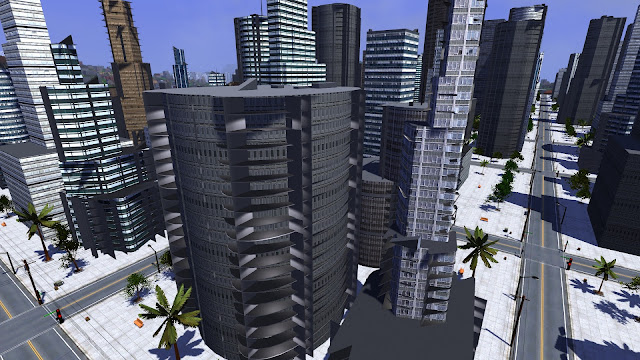
I recently attempted to add interiors to non cube shaped buildings. This includes cylindrical buildings with round sides, buildings with more than four sides, and buildings where stacked floors are rotated from the floors below. I was curious to see what the interiors of these buildings would look like. Note that all of the walls, doors, ceilings, floors, and rooms are still axis aligned cubes. They just stick out from the curved building exterior walls in interesting ways, giving some pretty amusing results.
Maybe it was a stupid idea to try adding rectangular rooms to round/cylindrical buildings? But this was in the name of science!
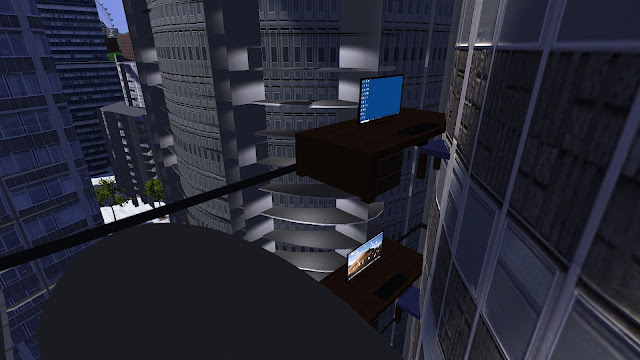
Some of the furniture, appliances, and plumbing fixtures are placed outside or partially outside the building exterior walls as well. This mostly happens at the corners of buildings. The lighting is wrong because there are no windows to "let in the sunlight", and I'm not sure where (if anywhere) the room ceiling lights are placed. I'm actually surprised I didn't get an errors from the building interior generation code. I suppose it doesn't care where the walls are and only uses the bounding cube of each part of the building.
Now that's what I call a corner office! Or maybe a windowless (and floor-less) office? I guess it works as long as you don't mind sitting halfway inside the wall of the building.
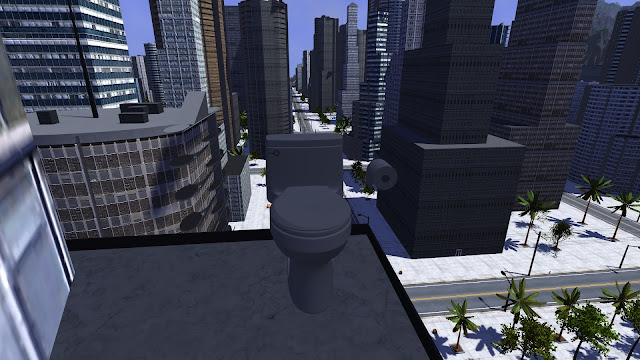
Even bathrooms can suffer from this problem.
Our bathroom doesn't need a ceiling fan because it gets so much fresh air from outside. You can even have a conversation with the person across the street while sitting on the toilet.
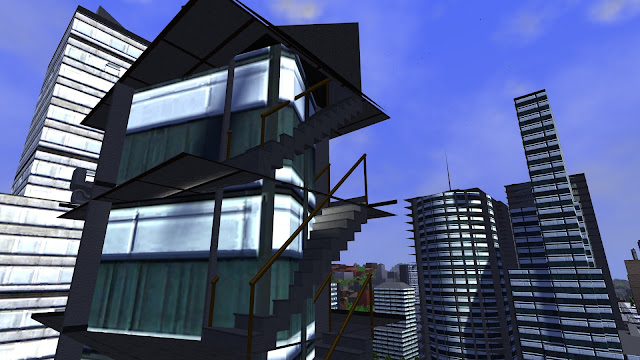
Stairs that would normally be against the inside of the exterior building wall are now on the outside of the wall. This made me consider adding fire escapes to the outside of some of the larger buildings. The biggest problem I can think of is that the lighting system won't work properly for these fire escapes for the reason mentioned above. It could take considerable work to fix that.
Yeah, those stairs are *supposed* to look like that. It's a .. fire escape! That's right. At least there are railings on some of the sides.
I attempted to fix some of these problems by removing objects placed outside the building. That fixes the biggest problems, but there are still issues. The internal floorplan doesn't make any sense, has empty areas, and doesn't fully connect the rooms. I've given up on this for now but left it on my TODO list, which is now on Trello.
I'm continuing to work on power lines connecting the buildings in my procedural cities. This is a follow up to the previous post where I first introduced power poles in residential cities. This time around I've improved the graphics, fixed wires intersecting buildings, added power poles and substations to cities, and connected cities together with transmission lines.
The graphics improvements are relatively minor. I replaced the simple truncated cone insulating standoffs used for wires with more complex accordion-like cone segments I see in reference images.
Power Lines to Houses
The screenshots in my last post showed some power wires connected from the lines near poles directly to the roofs of houses. I set the connection point as the point closest to the road on the highest part of the roof. That didn't look quite right, so I added those vertical metal conduits that protect the wires running into houses. This also avoids having wires clip through the edges of solar panels placed on the same section of roof as the wire start point.
I fixed the problem of wires sometimes clipping through other parts of the house or adjacent houses. The previous placement algorithm always connected each house to the nearest power pole. Now I do an intersection check of each wire with all nearby buildings, including the building the wire connects to. If an intersection is found, the next closest pole is chosen, until there are none left to try in the block the house resides in. Most of the time the closest (first) pole is valid and is selected. Occasionally this can still fail, but there were only around 20 failures out of the ~3000 connected houses.
Power connection from the roof of a house to the wires near a power pole. (Also, my above ground swimming pools now have ladders.)
Commercial Cities
As stated in the last post, most commercial office buildings are connected to the power grid through underground line rather than overhead wires. I do like the look of the power poles though, and they still need to provide power to city streetlights. I decided to add power poles and power lines to commercial cities, but have the building power routed into the ground through conduits. This is what I see in the office buildings and stores around my house in real life.
In addition, I found a "power substation" model that I can place on the concrete near the sidewalk on some blocks. This is the big metal transformer box with cooling fins that you tend to find behind buildings and on the sides of parking lots. These are placed when there's room for them. Here is what a power substation looks like placed in one of my cities.
Power substation/transformer next to the sidewalk.
Transmission Lines
I added transmission lines that connect the power grids of cities to their neighbors. Each line connects a pair of cities so that the entire set of cities is fully connected in a cycle free graph. This requires placing (num_cities - 1) transmission lines. I start with the closest two cities, connect them, then continue to add the closest city to the connected set until there are none left. In theory, it's possible that some connections fail and not all cities can be connected to the grid, but I haven't seen that happen yet.
I borrowed some of the path placement and cost estimate code from the city connector road placement algorithm. The placer will consider several points along the edges and corners of cities, typically within the pair of shared projecting edges of the two cities (if there is one). Otherwise, it will try to connect the nearest pair of corners to each other. A cost is calculated for each candidate, and the lowest cost legal path is chosen. Each connection is formed by a series of regularly spaced towers that follow the contour/elevation of the terrain, with three wires connected to insulating standoffs on each tower. Cost includes both the length and elevation change, similar to road placement.
If the terrain is very steep, the placer will try to insert additional towers that follow the terrain height to keep the wires from getting too close to the ground below. If this still isn't enough to fix the problem, the placement fails and another candidate path is chosen. If none of the paths are valid, these two cities are considered unconnectable, and a different pair of cities is chosen instead. This continues until each city has been connected to the grid, or all pairs of cities have been considered.
Transmission line with three wires on insulating standoffs, connecting power between two cities.
Transmission line routing is generally more likely to succeed than road placement because they can climb steeper terrain and aren't required to run in X (east-west) or Y (north-south) directions. Lines can cut across the terrain diagonally and can have any angle jogs to connect to the city power poles at their endpoints.
Next I had to ensure there were no trees or secondary buildings under or intersecting the transmission lines. The check for trees was actually quite difficult, and required various significant changes to the tree placement code. I also had to look up and implement some new math functions such as point-line segment distance calculations. In the end it worked well though, and gave me nice clear paths around the transmission lines like this.
Trees and other large plants have been cleared from the transmission line right of way.
Here's what a transmission line looks like when climbing over a mountain. In this case, the mountain range runs between the two cities with no convenient pass between them, so the only way to connect the cities is through the mountains. There's another mountain range on the other side of the city that blocks the power connection to its opposite neighbor. The placement algorithm examines multiple potential candidates before selecting this one.
Transmission lines are allowed to climb steep hills if there's no lower cost path. Towers are spaced more closely together in steep areas to keep the wires away from the ground.
That's looking pretty good, but there's still some work to do. I have to decide what to do about secondary buildings near power lines. I have checks in place that skip these buildings similar to how trees are skipped, but it doesn't look as good. The lines and towers are too close to houses, and the big gap with no buildings looks unrealistic. Plus it scrambles up the building placement so that I get randomly different buildings in the player's starting location every time I change the transmission line code. I feel the high-level building placement algorithm should somehow consider transmission lines when selecting building density or zoning in different areas.
I've made a lot of recent progress on 3DWorld's procedural cities, in particular the residential neighborhoods. They've definitely improved over the past few months as I've added fences, swimming pools, etc.
I walked around outside in my real life neighborhood to try and observe what objects I was missing in my scenes. One type item that stood out was telephone poles. I can add these as well as the wires that distribute power along the roads in my cities. Since I'm only going to create the power lines for now, and not the telephone wires, I'll call these "power poles" for the remainder of this post to match the name I use in the source code.
I started by adding wooden poles along one side of the road in both north-south and east-west directions. A single pole is placed halfway between each block/plot in each dimension, and a pole is placed in the corner of each intersection to connect the wires running in orthogonal directions. Then I added wooden cross beams to the tops of each pole to hold the wires. These are at different heights for each N-S/E-W direction at the corner pole to keep the wires from intersecting and shorting out.
Next, I added the wires themselves. A set of three high voltage wires run across the tops of the poles, while a stack of three low voltage wires are spaced vertically below them. I modeled wires as long thin black cubes. Making them pure black avoids having any shading that varies with lighting calculated from the vertex normals. This makes it impossible to tell that these are cubes rather than cylinders, unless you're looking into the square cross section of the end of the wire. Wires are attached to the pole and cross beams with white ceramic insulating standoffs. These are only drawn when the player is close as an optimization.
Power poles at intersections that connect wires running in the two directions have additional wires that connect the upper and lower set of three high voltage lines. They also have a transformer with connections between the high voltage and low voltage sets of wires. All of this produces a fully connected and electrically sound power grid. Real power grids don't have redundant connections that create loops, but this is close enough.
Finally, I connect houses and streetlights to the low voltage power lines with additional wires. Houses connect to points near the closest power pole. Streetlights connect to the closest low voltage wires, which are generally either the ones directly above the streetlight or directly across the street from it. The thinner wires connecting houses and streetlights to the low voltage power lines are drawn as a single wire rather than three separate wires to simplify the code. This effectively treats them as three bundled wires braided/wrapped around a steel support cable, as is common in residential areas. This multi-wire is connected to the three wires stretching between poles with a short vertical wire segment.
Here is an example of my power poles and power lines viewed at street level. I think I have the basic scales and styles pretty close to the reference images I used of real power lines.
Power lines connecting to houses and streetlights as viewed from the ground.
Everything is drawn with level of detail (LOD) based on a combination of
object size and distance to the camera so that smaller objects are only
drawn when the player is close by. In addition, cylinders and truncated cones are drawn with fewer vertices/divisions when further from the player. I use the bounding cubes of groups of
wires and the poles themselves for view frustum culling to avoid
drawing components that aren't visible to the player. The average draw time for all of these additional features is only around 1.5% of the total scene draw time.
One tricky problem was handling the power poles on the edges and corners of the grid. This can only happen for the poles placed at the corners of intersections as the remaining poles are placed on the interior of the city blocks. These power poles must be handled as special cases because the wires only connect in a subset of the directions and must be properly terminated at insulating standoffs. Poles on the edges connect with wires in three directions rather than four, while poles on the four corners of the grid only connect in two directions. In addition, the wires connecting to the transformer and between the upper and lower high voltage triplets must be moved to the direction of the pole facing the interior of the city. This allows the vertical connecting wires to connect properly to wires above and below.
Here's a second example, viewed from above with the camera in "flight" mode. Can you actually tell that these wires are cubes rather than cylinders? I can't.
Power line grid following roads, viewed from above.
This looks pretty good for now. I may add larger metal transmission lines connecting the different cities to each other at some point in the future. I don't have any generators or other sources of power to connect these to at this time. I haven't decided what to do about commercial cities with office buildings yet because the power lines are more likely to intersect with the larger buildings. Maybe it's okay to assume these cities use underground power lines and omit the poles.
I showed some images of new clothing and hanger models in closets in the last post. While I was looking for clothing models, I came across a monarch butterfly model created by Paul Spooner and decided to add that to 3DWorld. This somewhat fits with my "animals" module, which previously included only birds and fish. So, surprise! This isn't another update on buildings or cities. I'm going back and working on procedural generation in nature.
Butterflies, like birds, are flying animals. Flying and swimming animals
such as fish are easier to implement than animals walking on the ground
in some ways, and more difficult in other ways. Their physics tends to
be more complex because it's all in 3D with a vertical elevation
component. On the other hand, collision detection is easier since there aren't as many objects to collide with in the air and water. In
fact, the probability of two animals colliding is low enough that I can
basically ignore it.
Butterflies inherit from my animal C++ class and share some of the code with birds and fish. For example, they share code for random spawning within a terrain tile, logic to allow them to cross between tiles, per-frame physics updates, visibility queries, and drawing. What else can I share with the existing code? Let's see, I can reuse the
3D model drawing code with all of the orientation transform code from fish. (Birds are drawn as three flattened spheres rather than 3D models.) I can reuse the simple wing animation logic from birds. The
steering behavior can be somewhat reused from the random walk of both
fish and birds, though I certainly have to extend this system. I suppose I need logic to choose destinations and fly to them as well, because butterflies tend to land on plants and other objects. I don't have any code for that in the fish or birds system, but I can use a similar model to cars and pedestrians. So it looks like all the major components are there. I just have to copy/paste the right pieces and/or factor out the reusable parts.
The first task was to list all of the features I planned to add, in the order I planned to add them:
Loading and drawing of butterfly 3D model
Spawning in appropriate areas of tiles (over grass, avoiding water/rock/snow/cities)
Flight logic with random walk
Collision detection with scene objects (terrain, trees, plants, buildings, etc.)
Wing animation (model split into body + two rotating wings)
Choice of destination and logic to fly to destination
Optimizations
Color and wing pattern variations
Loading the model, drawing, and setting spawn points was pretty easy. Of course I had the size scale way off on my first attempt:
My first attempt: The Attack of the Giant Butterflies
At least the butterflies aren't hard to find! One side effect was that it was pretty easy to tune the model drawing and animation code when they're this large and easy to see.
It took me a few attempts to animate these models. I eventually decided to use a sine wave to rotate the wings 45 degrees about the body in opposite directions for each side. This isn't perfect as the wings clip slightly through each other and through the body. I watched a video showing butterflies moving in slow motion for reference. It seems like their wings don't quite rotate about a point as a rigid body as I was attempting to imitate. Instead, they flop around and bend like stiff cloth or paper. While my solution doesn't look great when viewing a stationary butterfly close up, it's actually difficult to spot the self intersections once the butterfly is small and moving in erratic patterns.
Flight logic was an interesting topic, and probably the one I spent the most total time on. Real butterflies don't fly in straight lines; their paths are much more random. This applies to their altitude as well as their heading. I decided to keep the butterfly model level with the ground and split the movement into an XY component parallel to the ground and a vertical (Z) altitude component. The variables controlling motion are:
Speed (affects movement speed, turn rate, and wing flap rate; tied to realtime)
Rotation angle about vertical/Z axis / in XY plane to control direction
Vertical acceleration to change altitude
I wanted to ensure very smooth movement, so I chose to add a random value to an accumulator for each of these variables each frame. The accumulator is then integrated over time to calculate an acceleration, which is then multiplied by time to get velocity, which is then multiplied by time again to update the position and direction of the butterfly. This should guarantee the path is second order continuous. All variables are clamped to a reasonable value at the end of a physics update. This includes caps for min and max altitude, max speed, max turn rate, etc. There are lots of constants I had to keep adjusting to get reasonable behavior, and now butterflies fly around in crazy random paths in an unpredictable way. Just like in real life!
Then I added code to choose destination points. I have flowers in the grass, but there are thousands of them per tile. Flowers are drawn using instancing and aren't actual game objects. This means I can't easily choose them as destinations. I went with using the tops of various types of plants as destinations instead, since butterflies often land on leaves. Butterflies in cities will choose to land on the grass in parks, if there's a park nearby. Otherwise they simply fly around randomly and try to avoid the buildings.
Their behavior finite state machine actually has four states: explore, find destination, approach, and rest. Butterflies start out in the "explore" state. After some time has elapsed, they will enter the "find destination" state and every so often will consider a random plant or park. If they find one that's close by and visible, they will enter the "approach" state. After landing at their destination they enter the "rest" state for a few seconds, then take off with a vertical ascent and transition back to the "explore" state. This logic results in butterflies moving from plant to plant in a slow, winding path.
Choosing destinations was easy; actually getting them to fly there was
much more difficult. How exactly is this crazy random flight path
supposed to end the butterfly at a particular location? After some
experimenting, I decided to use the distance to the destination to blend
between "explore" and "approach" behaviors. The approach force increases as the distance to the destination
decreases. At first, when they're far away, there will be a weak force
pulling them toward the destination. The random behavior will mostly
override this force, but they will slowly drift toward the destination
over time. As they get closer, the approach force will increase in
strength, allowing them to eventually home in on their target. They may take a very roundabout path, but they do eventually get there. It could be in tens of seconds or a few minutes. It took many
attempts to avoid the oscillation behavior during these state transitions, especially when they're very close to the destination but have the wrong altitude.
When I first implemented this I had no idea why the butterflies [mis-]behaved the way they did. I had to add debug visualization to show their flight path as a string of spheres, their destination point, and the line to their destination. The line color reflects the magnitude of the approach force: blue for weak, red for strong. These debug visuals also helped me find the butterflies in the scene, which are super tiny compared to the mountains, buildings, and trees. Here's an example where I have the debug visualization turned on but the trees and grass turned off.
Butterfly
path and destination debug visualizations helped me get the logic
right. It's obvious how their paths are nowhere near a straight line.
You can see just how wavy some of those paths are. This debug mode definitely helped, and I was eventually able to get everything working. Here's a video where I follow a butterfly around for a minute or so as it lands on a plant and takes off again.
I had to add a LOD (level of detail) optimization where the body and legs weren't draw unless the butterfly was close to the player. The only other optimization that was needed was better early rejection of trees and plants during collision detection. I reused the code I had for player sphere collisions, and it was never optimized for use with a thousand actors.
The final step was adding wing color and texture variation. The initial texture had the wing colors baked into the same texture atlas as the body. Paul sent me a texture with white wings that I was able to recolor in my code by overriding the model's material color per butterfly instance. I added a mix of monarchs and butterflies with white, yellow, orange, blue, and violet wing markings. These single colors don't look as nice as the multiple colors in the monarchs, but at least they add more color variety. I've taken a screenshot of a three butterflies here: monarch, yellow, and violet.
I added some other butterfly colors mixed in with the monarchs. Do you see the violet one on the right?
I created a second video with a large number of butterflies. There are thousands in this scene. The player is free to move anywhere in the world and new tiles with new butterflies will be generated around them.
I'm pretty happy with how this mini project turned out. It was a week well spent. Is it time to add other animals or insects, or time to get back to cities and buildings? I don't know, I guess we'll have to wait and see.
If I do decide to continue with butterflies, I might add a mating dance between males and females. I'm sure that getting the motion correct for a pair of them should be trivial. Right?
The source code for butterflies can be found here if you're interested.
I showed some simple colored, 2D textured billboard shirts hanging in closets in the previous post. Various people, including my daughter, commented that they didn't look very much like real shirts. That's true! Fortunately, Paul Spooner offered to create some proper 3D models of shirts, pants, and clothes hangers. I was able to replace my temporary shirts and hangers with these improved models and add actual 3D volume to these objects, as well as an increased amount of variety.
Of course this wasn't trivial. There was some work involved in integrating new classes of 3D models into 3DWorld's object management framework. First, I had to add support for multiple 3D models of the same object type for building interiors, similar to what I had to implement with cars and people. Then I had to add flags for models to enable two sided lighting, change the rotation point, override the default texture, and extract the object name from the model filename. All of these features will likely be useful in the future. In fact I've already started incorporating some of these features into the other (existing) types of room objects.
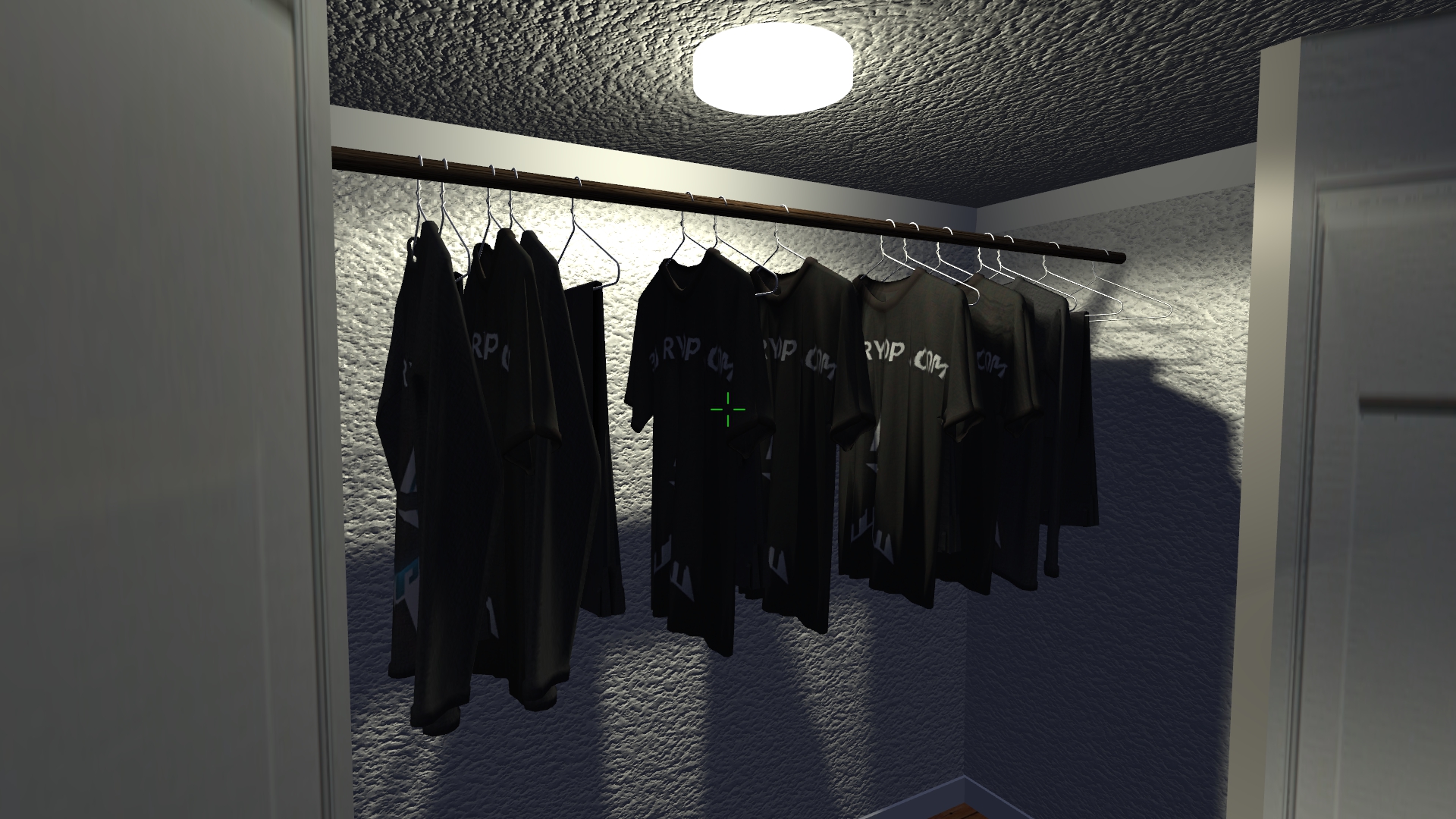
Here are some screenshots showing the current contents of closets. There are five different hangers, a tee shirt, a long sleeve shirt, and hanging pants. Some of the shirts are textured, while others are brightly colored. The player can steal the clothes and hangers, as well as push/rotate them to the sides by walking through them in the closet.
The original shirt models, textured with a logo.
Adding some colored shirts, but keeping the pants gray. The yellow shirt on the left is too bright, so I've replaced it with dark green.
The shirts here are placed too close together, and the yellow and white shirts intersect. I've fixed this by replacing a shirt or pants with an empty hanger in this case.
Shirts on the left, pants on the right. Everything casts a shadow.
Shirts and pants hanging in a closet with a lamp and box at the bottom. Some of them have been rotated.
I think closet interiors would look better if there was better ambient lighting. I haven't quite figured out how to do that efficiently yet. I'll post updated screenshots if I can find a way to improve this. Also, the clothes hangers are very thin, which makes their shadows blocky when viewed up close. It would definitely work better if I could somehow make that circular light source a small area light rather than a point light as that would give it softer shadows.
What's the next step? Maybe adding clothes to dresser drawers?