Monday, July 31, 2023

Stacked and Multi-Family Houses

I've recently put a lot of effort into improving building interiors by adding new types of objects and other details. Now it's time to revisit exterior geometry and room assignment, in particular for houses. I wanted more variety in house geometry, so I added a new type of house that has a smaller cube stacked on top of a larger cube. Then I made some of the larger houses multi-family homes split by floor. I'll describe these two additions below.


Stacked Houses

Houses initially came in two general floorplans, a rectangle and an L-shape. The L-shaped houses were formed from two rectangles placed next to each other with possibly different heights. This formed either an L-shaped floorplan, an L-shaped exterior vertical profile in cases where heights were different, or both. Each floor had the same floorplan so that a single set of vertical walls extended through all floors, and a set of stairs connecting them. Some houses also had rectangular basements, and some of those had a network of extended basement hallways as explained in this blog post. The combination of different heights, aspect ratios, roof styles, garages, sheds, porches, chimneys, etc. added a lot of variety to these otherwise simple shapes. However, I wanted to add even more house variety.

I've already created some styles of office buildings that have vertically stacked sections, where the upper stacks usually had a smaller footprint. There are some overhangs, but these are rare. This same stacking approach can be applied to houses, allowing me to place a smaller cube on top of a larger cube. Both the upper and lower cubes can have multiple floors. I added a 50% chance that each of the four sides of the upper cube is shifted inward to create a smaller footprint. If none of the four sides are moved, we simply end up with a single cube that has two different interior wall floorplans for the upper vs. lower levels. This is fine too as it adds variety to house interiors.

Here are some examples of houses created with this approach. These next three screenshots show houses with a combination of one, two, and three inset sides.

Two stacked part houses: Foreground house has a tall and narrow upper part; Background house has a small sloped roof section over one side of the lower part.

Two more stacked part houses next to each other, viewed through the power lines. Note that all houses in the same block use consistent exterior materials and styles.

A house with a wide bottom floor with garage, and a narrower upper part.

This was quite a bit of work to implement. I can't remember everything I changed, but it must have been over a dozen blocks of code. There are some obvious additions such as the custom sloped and overhanging roof quads on the lower cubes of the houses.

Note that the original version of these houses had steeper roofs on the lower parts, but I couldn't get the windows to look right. Removing the windows from the inset walls on the floor above the wider bottom parts created windowless rooms and caused other problems. While I did prefer the exterior look of theses houses, I just couldn't get the interior to be correct in enough cases.

The attic code had to be modified to only add attics to the upper parts of these houses. That change was relatively easy. What really got messy was adding stairs. Keep in mind that stairs are placed after adding walls and interior doorways. In some situations it was possible to add a single stairwell that extended all the way from the ground floor to the top floor without hitting any obstacles or blocking any doors. In other cases there was simply no valid location to add stairs, so stairs had to be split into two or three sections that were placed in different rooms. For example, the house in the foreground of that first screenshot has three sets of stairs: one connecting the bottom two floors, a second connecting the top three floors, and a third connecting the bottom part to the top part. Oh, and there's also a fourth set of stairs connecting the ground floor to the basement. The logic to place all of these stairs is quite complex and was difficult to implement. Updating the building AI (zombie) logic to navigate using these stairs also took some effort to get right. I actually had code in place to handle multiple sets of stairs, but it was broken in a way that wasn't triggered by the multiple sets of stairs that already existed in office buildings.


Multi-Family Houses

3DWorld's generated houses are typically smaller than office buildings, both in height and in their terrain footprint. Of course there can still be large houses. This usually happens with single cube houses rather than L-shaped houses, because the cube can fill the entire lot with no space cut out of it. Sometimes a house is generated at the max height of five floors and also near the max width in both X and Y. These are unrealistically large for a normal single family home.

For example, we have this monster house shown below. It has five floors with 17 rooms per floor, for 85 total rooms. There are 38 bedrooms and 8 bathrooms. My entire living family tree can stay in this house!

This house is too large for a single family, so I split it by floor into a five family apartment building. You can see the vents from all of the kitchens on the roof.

The solution is to split houses that are both wide and tall into multi-family homes. These can be anywhere from duplexes to small apartment buildings. The simplest solution was to assign one family to each floor and keep the same floorplan for each level. Here I mean the same walls and doors. The room assignments can be different, and they generally should be different, at least for the ground floor entry area.

This required significant changes. The most obvious change is that each individual apartment should have at least one bedroom and one bathroom, plus a living room, dining room, and kitchen when possible. This means that living rooms, dining rooms, and kitchens are no longer constrained to the first floor. Of course only the ground floor resident will have access to the basement (if there is one), but that may be okay for now. Room assignment is quite different, with some new constraints.

The second change was related to the front door placement. Regular houses usually have the front door connecting to either a small entryway room, or to the living room. However, it doesn't make sense in multi-family houses that someone should walk through the ground floor resident's living room to get to their upper floor apartment. No, we want the front door to connect to the room with stairs instead. If this isn't possible because the stairs room has no exterior wall, then the next best room for the front door is a hallway connected to the stairs room. Since hallways cross the entire part, and cube-shaped buildings only have a single part, we can place the door at either end of the hallway. Most of these larger houses already have a hallway, and most hallways connect to the room with the stairs. It should be rare to have stairs in a room that's neither along an exterior wall nor connected to a hallway. So far I haven't seen a house where this approach failed.

The above door assignment algorithm still has some flaws. In some cases the room with the stairs is assigned a function such as a living room, or it's not possible to reach every room in the house without crossing through the public stairs area. In fact the stairs room often has multiple doors, rather than the single apartment front door we would expect. I think I would have to go back to the floorplanning step to fix this. What we would really need to solve this is a dedicated entry + stairs room that connects to the front door and has exactly one door leading out to the rooms on each floor. Or we could possibly have an exterior stairwell with front doors above the ground floor. That could work, but would require significant code changes.

The third change I had to make is related to family names shown when the player enters the house. I kept the main generated last time for the ground floor tenant. This is what's shown on the sign above the front door (if present) and what's printed when the player enters the house from an exterior door. I used the hash of this name as a random number seed to generate different family names for the other floors above the ground floor. This is shown when the player uses the stairs to move to a different floor. The building's address and other string properties remain unchanged.

This system isn't perfect. Sometimes it's not possible to assign the required room types to each floor. Sometimes an exterior door can't lead to the room with stairs or a hallway connected to stairs. There are other ways of creating multi-family houses that avoid these problems, at the cost of introducing a different set of problems. For example, another approach I considered was to create duplexes by placing either two mirrored houses next to each other, or two symmetric parts (cubes) of the same house next to each other. This would make it easier to ensure the room assignment and connectivity requirements were met. Each part of the house could have its own front door without needing to connect through stairs.

This solution is more difficult to implement because it requires changing the exterior geometry and wall floorplan to work with duplexes. I would need to add logic to handle shared walls between units that doesn't assign windows or doors to these walls. There's also no easy way to guarantee symmetry for the two houses in the current procedural generation system. It's unclear how much better this would work and what other problems might arise. I decided it's too much effort to experiment with this approach since it's not an obvious improvement. I may change my mind about this later, so there may be a future post on this topic.

Saturday, July 22, 2023

Adding Building Interior Items

This past month I've been busy with summer related tasks and I haven't had as much time to work on 3DWorld. Much of my 3DWorld development time was spent fixing bugs in preparation for, and as a result of, demos I made to various relatives who visited me.

The new features I've added for July are fire extinguishers, pizza boxes, and shirts. I'll describe each of these in the sections below, along with showing some screenshots.

Fire Extinguishers

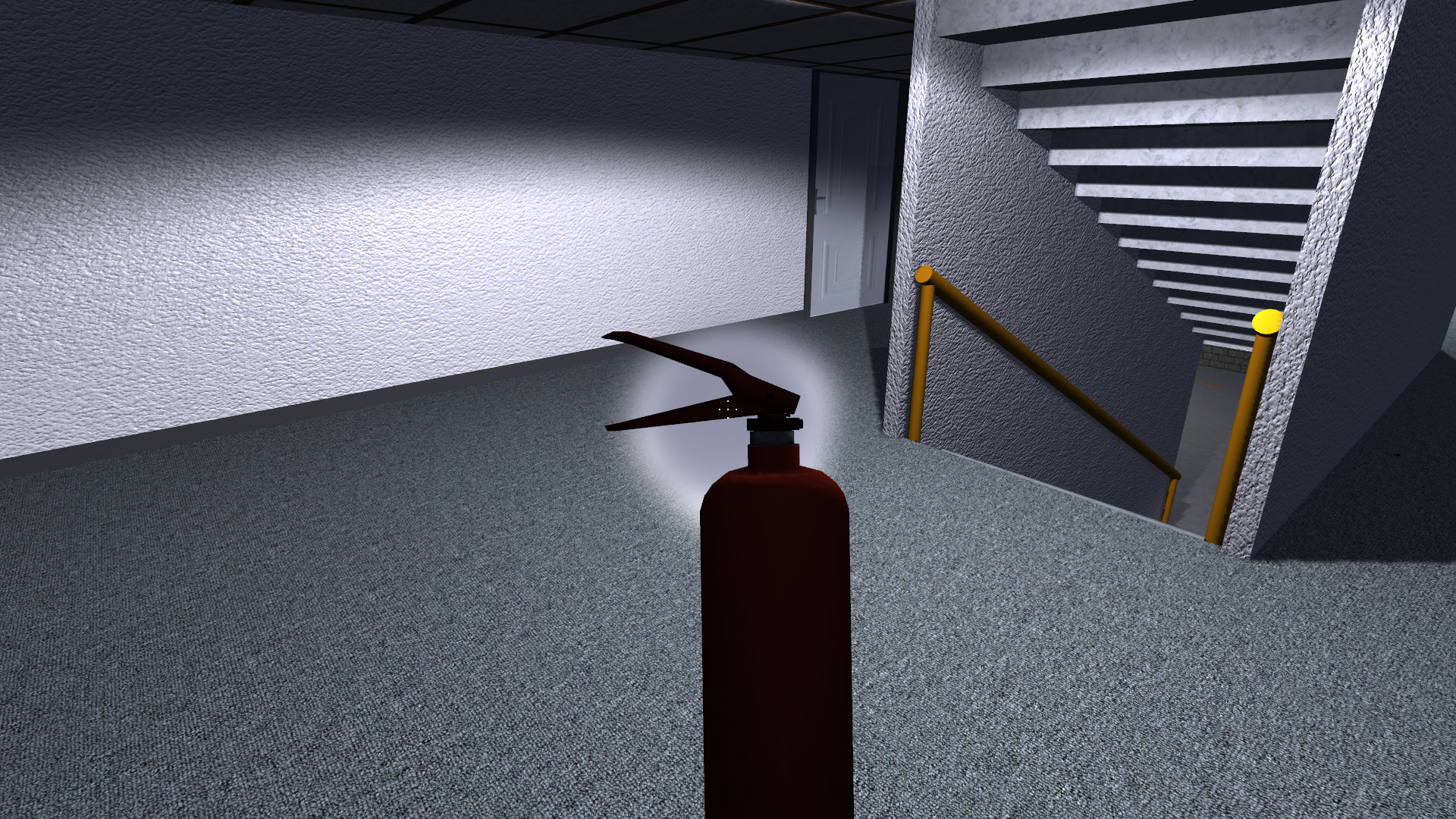
Interactive objects are the most fun to add. I don't remember how I came up with the idea of adding fire extinguishers, but I'm glad I did. They were both relatively easy to add and serve a gameplay purpose. They can be found in two places: hanging on the walls on each floor in office building hallways, and inside some kitchen cabinets in houses. Fire extinguishers are placed as three separate objects in office buildings: The sign, the holder, and the extinguisher itself. The player can take the sign and extinguisher but not the holder.

Fire extinguishers can be sprayed for up to a few seconds until they're empty. Empty extinguishers serve no purpose, but they can still be picked up and put down on the floor or the top of another building object. (Now that I think of it, I should have them squish spiders and cockroaches like books.) Spraying them produces a stream of smoke-like particles affected by low gravity that spread out until they collide with a floor, wall, or other object. These particles have two effects. First, they cause nearby zombies to temporarily retreat, similar to hitting them with basketballs and soccer balls. Fire extinguishers are more effective at keeping zombies away, but they have a limited number of uses. I think they can be used about five times on a zombie before they're empty.

The second use is to put out fires that were started on rugs by sparks from broken basement lights. This isn't very helpful for the player at the moment since these fires will go out on their own after a few seconds. However, if I decide to add fire propagation and increased fire damage later, this could be an important gameplay mechanic.

Fire extinguishers are drawn as 3D models and oriented so that the spray nozzle is facing away from the player when being held. They're put down with the same orientation/rotation the player was most recently holding them in.

Fire extinguisher attached to a holder hanging on the wall of an office building hallway. Notice the sign pointing to it near the top of the image.

Fire extinguisher removed from the holder by the player an in the process of being sprayed.

Fire extinguisher placed on a table by the player.

Pizza Boxes

My mother came up with this idea, as well as the idea to add shirts. I found a pizza box lid texture and slapped it onto the top of a flat white cube to create a pizza box. Pizza boxes are procedurally placed on surface such as tables, desks, and counters. They start out closed. The player can use the action key to open and close the box.

When the box is open the pizza is visible and can be taken by the player. If the player's health is low, pizza is eaten with a special chewing sound and adds +50 health. Otherwise it goes into the player's inventory, and is added to both their accumulated money and carry weight. Pizza boxes are therefore the first food/non-drink consumable in the game. I plan to add more types of food in the future, and assign them different gameplay effects.

Closed pizza box, ready to be picked up or opened by the player.

Opened pizza box showing the jalapeno pepperoni pizza inside.

Shirts

I had already added a T-shirt image that was originally used for shirts hanging in closets. Then I replaced the shirts with 3D models, and the image went unused. Why waste an image that's already in the git repo (online version control system); let's reuse it for non-closet objects. Shirts now can be found in two places: on the floors of bedrooms, and in the larger sized dresser drawers. (I don't add them to smaller drawers because they're always spread out rather then being folded.)

Shirts don't have a gameplay use, they're simply low-value, low-weight collectable inventory items. I did have to put some extra effort into making spiders, rats, and cockroaches walk over shirts rather than around or through them. I also had to add a special case so that rolling soccer balls and basketballs don't collide with and get stuck on "floor shirts".

A T-shirt left on the bedroom floor by some lazy person.
The two top dresser drawers have been opened, showing the T-shirts inside. The player's reflection can be seen in the mirror.

Bonus Image

I'll end this post with a bug I found in the algorithm that places stairs to connect different floors of houses. Well, technically it may be more of a closet placement bug. In any case, the problem was that I never wrote the code to handle intersections between stairs and closets. Closets are technically room objects, but they have their own walls and doors and are therefore somewhat special to place in a building.

A closet with stairs going to an upper floor hidden inside it. Definitely not a bug in the stairs placement code!
This bug was quickly fixed. I'm not sure how long it has been around, but this is certainly the first time I've noticed it. I think it's because I recently added the ability for stairs placement to cut through walls of houses when connecting multiple floors with different floorplans. Ah, I don't think I've written a post on the new house floorplans yet. That will have to wait until next time.

Sunday, June 18, 2023

Procedural City Stop Signs

Up to this point, 3DWorld's procedural cities have traffic lights at every 3-way and 4-way intersection for both roads inside the city and connector roads between cities. This works well for cities that are full of cars, but it may be overkill for residential neighborhoods with lighter traffic. Stop signs may be a better fit for these situations. I've added stop signs to residential cities, except for the intersections with roads connecting to other cities, which continue to use traffic lights.

It was easy to find a stop sign texture to use. Each sign is a two sided textured quad with the red "STOP" texture on one side and a white octagon on the other. The sign is placed on a square post, with an additional smaller "4-WAY" sign underneath the main sign at 4-way intersections. These are placed at all corners facing cars that will be entering the intersection. Stop signs are positioned close to where the traffic lights would be and can mostly use the same pedestrian and player collision detection system.

The next problem was adding street signs. I really like how every road has a unique procedurally generated name, but there's no traffic light to attach the signs to. It doesn't look right adding the street sign to the top of the stop sign with a vertical extension. So instead I added a second, taller vertical pole just behind the stop sign with the street name on a green horizontal banner at the top. I had to make this high enough that the largest vehicle (the truck) can pass underneath.

Here is an example stop sign on a 4-way intersection with cars and pedestrians enabled.

A 4-way stop sign with a street sign above and behind it. Cars and people are both waiting to cross.
 

The most difficult step was writing the traffic logic that controls cars reaching stop signs. As with traffic lights, the only real function of this stop sign logic is to tell each car that's about to enter the intersection whether it must stop or can proceed. Once the car is in the intersection, it's free of the intersection control logic and only subject to the car and pedestrian collision checks.

The first step is obvious: Each vehicle must stop at the stop sign, independent of the intersection state. This is accomplished by braking/decelerating when approaching the intersection, starting a timer when fully stopped, and waiting until 0.25s has passed before querying the intersection for permission to enter. This small time delay is enough to prevent a rolling stop. I may decide to make the wait randomly generated per-vehicle to add some variation.

The next step is to determine whose turn it is. We conveniently already have a timer recording when each car reached the intersection for stopping purposes. Each car will then check if there are any other waiting cars with earlier times that should enter first. This check only applies to cars that will cross paths, using the following logic:

  • If cars start at the same location, this is an error.
  • If cars end at the same destination (one of the 3 or 4 exit directions), they definitely cross.
  • If either car is turning right, they don't cross.
  • If either car is turning left, they cross.
  • If we got here, both cars are going straight. They cross if they're going in different axes (one north-south and the other east-west).

I later discovered that the trucks make wider right turns and will in some cases clip through other vehicles making left turns. So I had to add an extra step into the logic:

  • If either one is a truck, one is turning right, the other is turning left, and their paths are diagonally opposite each other, then they cross.

This set of cases appears to be correct. But it's actually more complex than this, because we also have to consider other cars currently in the intersection. My solution was to have cars register themselves with the intersection when entering and remove themselves when exiting. The intersection has 3 or 4 slots corresponding to its entry points that store the turn direction and is_truck flag for each car that's using it. Then the intersection must run the same logic above on any active slots that cross the path of the current car that is asking for permission to enter.

The next problem I ran into was a deadlock case where cars were waiting at each stop sign but no one was going. This took me a long time to reproduce, debug, and fix. I eventually had to add code to detect this case by looking for cars waiting for more than 60s, show where it was happening in the world, and print debug state for the intersection. It turned out that this was caused by cars blocking the intersection because there was no space for them to turn and exit the intersection. This was because cars were queuing up waiting at a traffic light to exit the city, and the line of cars was backing up all the way to the intersection. This in turn was causing the car attempting to enter the intersection to stop while partially inside. The problematic car had already set the "entering intersection" flag for that lane/direction as it had started to move. But when transitioning back to a "waiting" state while space for it to turn became available, it was actually blocking itself from continuing when it was able to. The fix was to have a car clear it's own intersection usage state when stopping while inside and intersection. This will also allow other cars to continue while one car is blocked, which may or may not be correct. I think this is okay because we know they can't pass the initial car as the destination spot is known to be blocked by another car. Therefore, they must be waiting as well, and only one car can claim any spot that opens up.

This overall solution mostly works. There are still some rare cases when cars spawn inside an intersection, or a lag in frame rate causes them to cross through an intersection without properly registering a matching enter + exit event. If left unchecked, this can lead to deadlock where none of the cars can enter. I think one correct fix is to record time stamps for entry events and automatically remove them after a few seconds in the per-frame logic update pass of each intersection. However, I haven't seen this happen after some other tweaks, so it's either fixed now or very rare. I may have to let the simulation run for hours in the background to see if anything fails with the stop sign logic.

Here is a video showing cars following stop sign rules at an intersection. The only issue is that trucks cal still get too close to cars when turning. This can lead to odd behavior as they attempt to avoid collisions that shouldn't actually be possible. I haven't come up with a good fix for this, so I'm calling it done for now.


Wednesday, June 14, 2023

Procedural Building Additions, Interior and Exterior

Once again I have a number of procedural building changes that are too small for their own blog post. I'm working on stop signs, which is a larger topic, but they're not done yet. This post will list the various additions I've made to building interiors and exteriors.

Fires

I showed off the spark particle effects that were added for broken TVs and basement lights in a previous post. When I reviewed that video, it made me think that all of those sparks landing on the rug should set it on fire. So this is what I implemented. Now a spark landing on a rug while it's still hot and glowing has a chance of starting a small fire. I haven't worked out how to handle large fires that spread to the rest of the building, so for now the fires will go out after a few seconds. They do, however, leave lasting burn marks on the rug.

Fires also serve a minor gameplay purpose. In the (unlikely) event the player starts a fire and then walks through it in game mode, they take some small amount of burn damage. This provides a minor distraction from other gameplay tasks and forces the player to pay more attention in rooms with broken lights. Other animals such as rats and cockroaches have updated logic that attempts to avoid the fires. I haven't yet updated the building AI and zombie logic to avoid fires. I feel that zombies should be able to walk through small fires to get to the player.

Here's a short video showing fires created from sparks in the same room as the earlier sparks video.


Attic Vents

I wrote about 3DWorld's interior-exterior geometry in a previous post. This is where "room" objects can be added to building exteriors and will be lit from the sun and moon outdoor lighting rather than interior room lights. I used this a few weeks ago to add window frames and window sills. Now that I have this system in place, I can use it for more exterior detail objects.

One object I'm missing is exhaust vents that pass through the attic and its roof. I added these for furnaces, water heaters, and stove hoods. These are simple pipes that are split into two sections with the lower section inside the attic using interior lighting, and the upper section on the roof using exterior lighting. The vent sections inside the attic also participate in player collision detection and act as blockers for attic object placement. Anything I can do to increase attic clutter improves the realism of the scene.

Here is what these look like from both inside and outside the building.

House attic with a vent from the furnace on the left and another larger vent from the stove hood two floors below on the right.

The same two vents protruding through the roof with end caps that use sky/sun/moon lighting.

I may add more details in the future if I get around to it. Maybe I can make some of them have rotating blades like a fan? I might also add vents for the various plumbing fixtures such as sinks and toilets. I'm not sure exactly what needs a vent. My real life house has something like eight different vents on the roof of various sizes, and the roofs of my procedural buildings don't seem to have enough of them.

Parking Garage Sprinklers

I added large vertical fire suppression/sprinkler pipes to office building parking garages over a year ago. Then a few months ago I added smaller horizontal pipes that lead away from the main water pipe across the roof of each parking garage level. I finally got back to working on this sprinkler system by adding secondary horizontal lines that extend from these first lines. These pipes are placed relatively close together in a grid pattern that attempts to cover all reachable areas of the parking garage.

The placement system must check for intersections with objects such as stairs, elevators, and support pillars. I allow sprinkler pipes to pass through parking garage separator walls in a similar way to water, gas, and sewage pipes. I hung these lower than most other pipes so that they touch the bottoms of the ceiling support beams and stay out of the way of many other ceiling objects. They're placed after other types of pipes, so I need to check for pipe intersections as well. I wrote some code that is able to place partial sprinkler pipe sections in incrementally shorter lengths when the full pipe fails to be placed. In some situations, sprinkler pipes can clip through ceiling lights. I fixed this by a combination of moving the lights to the side and shortening the pipes. I would say that about 75% of the total pipe length can be added on average, which is good enough for now.

Next came the sprinklers themselves. I added upward pointing vertical sprinklers at regular intervals along the smallest diameter (last placed) horizontal pipes. Once again, I had to check for overlaps with other objects near the ceiling and omit the sprinklers in those cases. I also shortened pipes to remove extra segments that had no sprinklers or other connecting pipe sections. Short pipes that don't end at walls are attached to the ceiling with small metal loop hangers/brackets.

All sprinkler pipes are drawn as red cylinders with brass fittings, connectors, and end caps. The bright red color makes them stand out and adds contrast to the otherwise gray parking areas. Sprinklers are formed from three cylinders of different lengths, radii, and colors. I considered using real 3D models for each one, but I'm worried that too many will be visible in large parking garages and this will hurt the framerate. In some cases nearly 100 sprinklers can be seen in the player's view.

Here are two screenshots of a parking garage with pipes and sprinklers. The first is without cars, while the second is with cars and indirect lighting enabled.

Parking garage with a network of red pipes and sprinklers attached to the ceiling.

The same parking garage as above, this time with cars and indirect lighting enabled. I feel it's easier to see the pipes with this lighting.

Newsracks

This one was suggested by my mother. I've added newsracks along the sidewalks of some city streets. They come in four different shapes/styles and a number of different colors taken from reference images of real newsracks. These are all drawn with geometry generated from code, mostly cubes of different sizes. I added a fake newspaper image I found online to the transparent doors of each one. As usual, newsracks are collisions objects that block the player and participate in pedestrian path finding. At some point I may decide to make these interactive so that they player can open them up and take a newspaper. Maybe the player will need to find coins in a building to do so.

Here are two example images, again without and with cars.

An example city sidewalk with newsracks of various sizes and colors along the edge of the road.

More "The Fake News" newsracks, this time with cars enabled.

Rooftop Water Towers

A few weeks ago I did a Google search for other people's procedural buildings to see if any of them inspired me to do something new. One YouTube video showed buildings with rooftop water tower models. That seemed like something easy to add to 3DWorld's buildings that would increase the variety of their roof areas and improve city skylines. Water towers are relatively simple to model out of cylinders and cones for the tower and pipes, plus cubes for the support structure. So I decided to generate the geometry rather than using an existing 3D model from somewhere online. I used a metal plate texture for their exteriors and pipes.

Water towers are placed on some buildings above a certain height and a minimum rooftop area. These are skipped for buildings that already have helipads, skylights, antennas, or other previously placed objects. Water towers are placed before smaller objects such as AC units, signs, and roof access doors, so these objects must check for existing water towers before being placed. Each water tower is also connected to the network of water pipes in the basement, if present.

I may as well continue the trend with two images of the water tower and different sun positions. I added a vertical pipe under the tower in the second image. That Ferris wheel in the background is a great landmark for navigation!

Initial metal water tower 3D model created from a texture cylinder, a cone, and five cubes.

The same water tower viewed with a different sun position and a metal cylindrical pipe added to the bottom to carry water.

Pool Decks

At this point I had both in-ground and above ground swimming pools in the back yards of some houses in my residential neighborhoods. The above ground pools had ladders, but the in-ground pools were simply surrounded by grass. This isn't realistic. All of the in-ground pools I've seen, including the one in my own back yard, have decks around them. So I placed a randomly selected concrete or wooden deck on the ground between the pool and the house. In rare occasions there was some other object between the pool and house, so the deck is omitted in that case. I added some additional random variation that extends the deck to the length of either the house, the pool, or both rather than only inserting it between the shared edges of the two objects. Sometimes the deck will line up with the back yard fence, which I think is a nice touch. This was a minor change that was easy to add.

As expected, two images of concrete and wood pool decks. I think I need to add more details around these pools to make them look interesting.

Simple concrete pool deck placed between the house and a rectangular in-ground swimming pool, enclosed by a fence.

Another swimming pool with a long wooden deck connecting it to the house.

House Balconies

Some of the other procedural building posts and videos I looked at included balconies in their residential buildings. I decided to use the exterior geometry system yet again to add balconies to upper floor rooms of some houses. There are a variety of different balcony styles with wood slats, metal railings, and 45-degree rotated railings, possibly with metal trim of different colors.

Next, I added potted plants to some balconies. These initially didn't work well because the plant leaves aren't drawn as they're on the wrong side of the transparent windows. It took me awhile to rearrange the transparent and alpha mask drawing code to make this work properly. I plan to add small tables and chairs to balconies, but I haven't gotten around to doing that yet.

Balconies are somewhat incomplete at this point and have some issues. First, they're not actually connected to the houses with a door, so the player can't walk out on them. Adding this type of door appears to be complex and difficult. I have the same problem with fire escapes. It may require significant changes to the building creation control flow because currently the balconies (and fire escapes) are added after the doors and windows.

Second, the lighting and shadows aren't quite right. Since balconies are between the exterior and interior, they should have interior light shining through the windows onto them. At this point they don't. Balconies receive shadows from the house but don't self shadow because room objects don't contribute to the sun and moon shadow pass. This also means they don't shadow the rest of the house or the ground below them. I don't have a good fix for this, so I'm hoping the player doesn't notice. I actually didn't notice the lack of shadows at first.

I'll add several screenshots this time since balconies come in so many varieties. I also changed some settings and fixed a few things (like the missing plant leaves) in the process of taking these.

A house with a small balcony with white metal railings and an empty flower pot. The edge (non-corner) railings are rotated 45 degrees just to show I can add shapes other than axis aligned cubes!

Balcony with wooden slat sides and black metal railing and edges.

A longer railing along the side of a house, this time with a black metal railing and bars. This one has two "empty" flower pots.

A balcony with wooden sides and a brown railing, with two flower pots. These ones have actual plants because I fixed the alpha mask material drawing to work outdoors.

I should probably add vertical posts to support the corners of some of the larger balconies. That means I do have to figure out how to enable collision detection for what are supposed to be indoor room objects that happen to be placed outside the house. The lack of shadows may also be more obvious when I add the posts. I'll have to experiment with this later.

I think this post is long enough now. The next post will probably be on the topic of stop signs.

Monday, June 5, 2023

Cockroaches in Buildings!

I can't resist adding another "animal" type to 3DWorld's procedural buildings. It was a lot of fun (and also a lot of work) to add rats, spiders, snakes, and flies. Now that I have all of the framework in place for animal drawing, animation, physics, collision detection, behavior, etc., it should be easy to add more animal or insect types. Cockroaches are somewhat of a cross between rats and flies. (Well, assuming you only have the four animals/insects mentioned above to work with.) They walk on the floor and run away when scared like rats do. Their placement and drawing code is closest to that used for flies. I was able to reuse enough code from existing animals that it took me less than a week to add cockroaches, compared to several weeks for rats and spiders.

Cockroaches have some unique behavior characteristics. They only spawn in dark rooms away from the player, building AI people, and zombies. They have a random walk => stop => turn cycle similar to rats with some degree of random speed variation. When they're startled by a light, a sound, the player, or another person, they immediately run toward the closest wall in a direction away from whatever scared them. When reaching a wall or other object flagged as a hiding spot, cockroaches disappear inside and are respawned somewhere else in the building. Their new location will be somewhere dark and out of view of the player. If they instead hit an object they can't hide under, they turn away from the object, suspend their fear state for a few seconds, and walk in a random path.

So far I haven't assigned any gameplay purpose for cockroaches. They don't affect the player or zombies. The player can't pick them up, but they can be squished by dropping objects such as books on them the same way as spiders. However, it's quite challenging to squish cockroaches due to their fast speed, small size, and ability to hide under objects. Maybe I should track kill counts for both spiders and cockroaches. As a placeholder for this, I add $10 damage for each squished bug for building cleaning costs. (For reference, cleaning the blood stains from a player death is $100.)

I originally drew cockroaches as simple stretched brown hemispheres: long and flat. I didn't bother to add legs because it was difficult to get close enough to see them. Later, I decided they looked too plain, so I found a 3D model online that looks much better. So far I haven't felt the need to animate their legs because they're so small and move so quickly. The 3D model rendering code is almost identical to that used for rats, in particular because they're both always oriented in the XY plane on the ground.

Here's a video showing a building with 1,000 cockroaches. They scatter when I turn on the light and approach them. Note that these are drawn at an incorrect height and their legs are under the surface of the floor. I've fixed that in the other screenshot and video below.

And here's a screenshot showing the 3D cockroach model I used. Yeah, it's pretty small and hard to see.

Cockroach on the floor, drawn with a 3D model.

Here is a video showing me attempting to drop books on cockroaches to squish them. It's challenging and took me a number of tries to get the first one. They have yellow blood!

Do you have a suggestion for what animal or insect I should add next? If so, please leave me a comment.

Wednesday, May 31, 2023

Procedural Buildings: Breakable Objects and Particle Effects

I have a long list of smaller additions and improvements to show, so I'll split them up by category. This post will show some of the breakable and broken objects I've added to buildings, and the particle system I implemented to add glowing spark effects to broken electrical objects. Some of these have been around for a while, while others were recently added.

Broken Car Windows

I added the ability for the player to break into parked cars in office building parking garages to steal items. This was done a year or so ago, but I don't remember posting a screenshot or explaining it on this blog. Each car window can individually be broken once by using the player action key on the car. Some cars happen to be unlocked and can be looted without breaking the window. I can't easily modify each instance of the car's 3D model to remove a window, but I can draw a pile of broken glass on the ground at the player's feet. As you might expect, each pile of glass is unique. This glass will remain in the building forever to help players keep track of which cars they've already broken into. This was an easy change to make. I may decide to go back later and make the glass shards dynamic physics objects, or possibly allow the player to pick them up for some gameplay purpose.

A car in a parking garage with broken glass from the window on the ground.

Broken Mirrors

Throwing an object at the center of a building mirror will break it and add a crack decal texture over the reflective surface. One of two crack textures is randomly selected for each mirror. This works with dresser mirrors, office bathroom wall mirrors, and house medicine cabinet mirrors. While the player can drop various types of inventory items, the only object types that can be thrown are basketballs and soccer balls. Therefore, these are the only objects that can be used to break mirrors and other glass surfaces.

Breaking mirrors plays a loud glass shattering sound, which of course is guaranteed to attract zombies. Breaking a mirror also unlocks the "7 Years of Bad Luck" achievement.

Mirrors can be broken by throwing balls at them. Broken mirrors are cracked but still reflective.


I've considered making windows breakable, but so far haven't figured out how to do this. Windows aren't individual objects but are instead drawn along the entire side of the building, and are visible through cutouts in the walls. I would need to split these up into individual window panes somehow, then add the crack texture to each broken one. Some of the house windows are already divided vertically or horizontally into 2-4 panes, which further complicates things. A second challenge is adding a transparent overlay to an object that's already transparent in a way that makes the alpha blending correct. Of course, writing about it here will increase the likelihood that I actually complete this feature later.

Broken TVs and Computer Monitors

The player has been able to throw balls at TV and computer monitor screens to break them for a while now. The new feature to showcase is the particle system I've added that will spawn glowing sparks around the area where the ball and screen meet, as long as the device was powered by electricity. These sparks are physics objects affected by gravity with collision detection enabled for all room objects. I was able to reuse most of the basketball and soccer ball physics and collision code for particles, with some adjustments to physical constants to make their paths more pleasing. For example, sparks use lower gravity so that they remain in the air for longer.

Each broken object spawns a new group of particles that will disappear after their lifetime expires, which is currently set to a few seconds. This way only a small number of particles will be active at any given time and won't affect performance much. Sparks are drawn with an emissive colored material stretched out along the length of their velocity vector. Their color follows the normal black body light emission profile as their temperature decreases over their lifetime: white => yellow => orange => red => black. Light emission decreases over time, and transparency increases.

Later I decided to make these particles act as small light sources to illuminate the walls, ceiling, floor, and other nearby objects. The screenshot shows light sources, while the (older) video was taken before this was added.

Still screenshot of a TV screen that's just been broken with a basketball, with sparks flying around the room and producing light.


Broken Lights

There are two types of broken lights. A while back I added flickering lights with a random chance to occur in basements and parking garages. These lights are mostly on but turn off for a few frames every few seconds.

The new type of light I added is even more broken: normally off, with an occasional flash of light and a continuous shower of sparks. This was a convenient way to reuse the particle system I developed for TVs in a setting where the sparks are constantly visible, rather than only being seen briefly for a few seconds. These types of lights are only added to house extended basements rooms, giving them a dark and creepy atmosphere. Broken lights are always initialized to the off state and must be turned on by the player to make them active. This increases the amount of surprise when the player encounters a shower of sparks rather than a lit room. So far I haven't decided if I want the building AI people to turn these lights on as well.

Still screenshot of a broken light emitting glowing sparks that fall to the floor. Maybe they should catch the rug on fire?


It's possible to have a large number of broken lights in a building due to the way occlusion culling works. Since they're conveniently only added to basement rooms, I don't have to worry about them being visible through windows. The player can only see the lights and the sparks when the clipped light volume is visible. This means I can reuse the existing light bounding cube occlusion queries to skip generating, updating, and drawing the particles when the light is blocked from view by a wall, ceiling, or floor of the building. As soon as the player turns to leave the room or walks around the corner, these lights will become inactive and won't take any resources to draw or update.

Future Work

Broken lights don't really affect gameplay, except for reducing zombie (and player) visibility due to the dark room. Maybe I should have sparks catch rugs on fire? It sure seems like that rug should be bursting into flames in the screenshot and video above. That could damage the player and also either distract or kill zombies. Okay, I'm adding that to my TODO list.

I have plenty of other ideas for breakable objects. I could add a tool such as a crowbar, hammer, or bat that can break objects. I could allow some inventory items such as cups and vases to be dropped or thrown on the floor to break. I could provide a way for the player to create holes in the walls, ceilings,  floors, or doors. There are so many possibilities. I need to take some time to think about how gameplay will work and the various ways in which breaking/destroying objects would benefit the player.

Monday, May 8, 2023

Procedural Buildings: Connecting Basements

Some of the houses in 3DWorld have extended basements consisting of a maze-like tree of underground hallways and rooms. These can run under the house and nearby buildings, as long as no other buildings are intersected. I like these mazes. I like anything involving underground networks to explore where the player can get lost, in particular in a horror game setting. The current limited size of each house's extended basement prevents me from adding larger mazes. It's not just a problem with available space, it's also a problem with reduced performance when adding too many rooms to a house or making it's bounding cube too large. The various building view culling methods I'm using are less effective when many buildings overlap in 3D space.

One workaround for this is to allow basements to connect between multiple houses. In fact, they can connect together in a massive dungeon maze that runs under the entire residential neighborhood. This case is made easier because all houses are at the same elevation, so I don't even need to add stairs to connect rooms at different levels. I decided to start by grouping houses by city, and attempting to connect each house in the city to every other house placed after it. This is quadratic in runtime, though only for a few hundred houses at a time since they don't all have extended basements. The final runtime for this step was only 19ms for all four residential cities combined. I didn't even have to make the code multi-threaded.

If two nearby rooms that project in X or Y can be found for each of these houses, a new hallway room is added to connect them. I cut a hole in one of each of the room's walls to insert a door. I placed a red light on the ceiling of this room to make it stand out more. This way I can find and debug connector rooms by disabling collision detection and flying below the ground looking upward for the red lights. I'm glad I added this for debugging because I certainly found a lot of problems with this system! Every room had some new bug. I'm sure I haven't found and fixed them all yet.

The only downside is that this was very complex and difficult to get right. Not only does it need to look correct, but the AI and physics must work as well. On the visuals side, I had to make sure the occlusion culling didn't flag the other house as invisible as it normally does with other buildings when the player is underground. Then I had to work out the lighting and shadows so that the connector room could cast and receive both light and shadows from the rooms of the two houses that connected on either end. These had to be updated when the user toggled the lights or opened/closed the door from either side. In addition, the ambient lighting system had to consider light coming through the open connector door.

Physics was also quite challenging. I had to update the player collision detection to allow walking between buildings without being blocked by the basement bounding cube, and without the player being considered outside a building for one frame and popping out of the building on the ground above. This last problem took me many attempts to fix! In fact, I think it can still happen in rare occasions when a building person or zombie pushes the player into a wall near the connector room.

Players had to be able to open or close the connector room doors from either side, which means I had to support interacting with a door belonging to a different building from the one the player was inside. Next, I had to allow the player to carry inventory items between buildings without them being deposited in the player's permanent loot collection as would normally happen when exiting a building. Building animals and people AI were updated to handle these connector rooms. I didn't quite figure out how to have them cross between buildings, but at least they don't get stuck there. Zombies will follow the player right up to the connecting door and wait for a few seconds before walking off. This provides the player with an escape route. I think that's fair because it's far too easy to get cornered or lost while being chased in a basement maze. However, chances are some zombie in the other building heard you and is on the way to find you.

Probably the most difficult feature was adding support for basketballs and soccer balls that could be rolled, kicked, or thrown through the doorway into the next building. These objects have physics state owned by their contained building. I had to transfer this state from one building to another in a way that preserved the properties such as position, velocity, and momentum. There were various special cases to handle. For example, the player can stand in one building while holding the ball through the doorway into the other building. The physics must be seamless across the boundary.

Here are some examples of extended basement connector rooms.

Extended basement connector hallway with red light, a picture on the wall, and a rug on the floor.

Hallway connecting one house basement to an underground storage room in a different house.

Room connecting two house basements. You can tell that the connector room belongs to the building the player is in because the carpet matches.

They look very similar, especially with the red lights. At the moment this is a somewhat intentional way to let the player know they're passing between buildings. There's also a "Welcome to <NAME> Residence" text to let the player know whose house they're entering. Maybe I should select a random light color from a list of colors? I'm not sure. I experimented with different colors and I definitely like red the best because it produces a sense of danger and has a good contrast with the off-white color of other ceiling lights.

What's next? Maybe I'll figure out how to have people and animals cross between buildings. Maybe I'll connect office building basements and parking garages in a similar way. There are so many possibilities...