Saturday, February 25, 2023

Procedural Building Skylights

I'm always looking to improve the realism and variety of 3DWorld's procedurally generated buildings. One problem I have with some of the larger office buildings is that they don't have enough natural light. Sometimes they don't even have enough artificial light when the placement algorithm fails to add light fixtures to the ceiling. I can fix this (at least for the top floor) by adding skylights to some of the buildings with flat roofs.

This was no easy task, and required implementing and fixing a variety of systems. What makes this especially challenging is that skylights form an interface between the interior and exterior of the building. These two parts are drawn using entirely different approaches and code, so it's not clear exactly how a skylight fits into this system. For example, interiors are only illuminated by room point light sources, while exteriors are illuminated by directional lights from the sun and moon. The solution I ended up using was drawing the transparent glass as part of a building's exterior, while the horizontal metal bars separating and supporting the glass panes are drawn as part of the interior. More on that below.

Before I jump into drawing and lighting skylights, I have to go over how they're placed and incorporated into the building's exterior geometry. The easiest case is to only add skylights to buildings with large flat roofs. This limits skylights to office buildings, since houses always have sloped roofs. (Plus, I'm not sure how well skylights combine with attics.) In addition, skylights are only added to cube-shaped (non-rounded/angled) buildings because these are the only type of buildings with generated interiors. If there's no interior, then what's visible through the skylight? Empty space? The ground?

Once a suitable roof is chosen, the skylight is dropped somewhere within it, in most cases near the center. The size is chosen randomly from between 20% and 40% of the roof size in each dimension. Ideally we want to place the skylight in some sort of public area like a hallway or lobby, but unfortunately rooms haven't been assigned yet. In fact the walls haven't been added at this point. Skylights can be seen on distant buildings when flying above them long before the interior walls and room objects can be seen, so we must generate them first. I guess the room placement algorithm will have to handle this later. As it turns out, this breaks my floor-planning system. Office building floor plans are shared across multiple floors and can't easily be customized for the top floor to handle a skylight. The template-based hallway assignment system of larger buildings also isn't flexible enough to work around a skylight that's larger than a single room. I want to support large skylights without this size limitation.

So in the end I simply cut the walls, doors, and door frames a bit shorter so that they can fit under the skylight, and I draw their top surfaces since they're visible in this situation. That leaves the elevators to deal with. Ideally the tops of the elevators shouldn't reach the skylight. Real elevators usually have machinery in the space above them. However, some skylights cover the entire valid elevator placement area, so there's no way to place an elevator that doesn't intersect a skylight. The best I can do is clip the top of the elevator in the same way as the walls so that it just touches the bottom glass of the skylight. The problem here is that the light and inside roof of the elevator car can extend above this point. I had to hack around this with some not-quite-volume-preserving adjustments to the elevator car z-values when it reaches the top floor. We just squish the ceiling down a little bit. It's difficult to spot though, so I expect users to not even notice.

Now that we've chosen the skylight location and hacked the geometry under it to make it look correct to the casual observer, it's time to cut the hole out of the roof. Fortunately, I can reuse the code that cuts holes in the roof for the roof access stairs. This is probably the only part of skylight addition where I can reuse existing code! The next step is to fill in that hole with a partially transparent glass plane that's recessed slightly vertically. Which of course doesn't "just work" because alpha blending is disabled for building exteriors. No problem, I can simply add the skylight as a fake "window" and that surprisingly worked the first time. I don't have to worry about lighting from the interior lights on the glass because skylights are transparent enough that the user can't tell if the lighting is incorrect.

The next step is to add the white metal horizontal supports for the glass panes. At first I wasn't sure how to do this because they need to be lit from the sun or moon above, and from the room lights below. Exterior objects are only lit by the sun/moon, while interior objects are only lit by room lights. I think that's too much geometry for the exterior, so it makes more sense to have the bars be interior room geometry. As for the sunlight from above, I can place an invisible room light in the air far above the skylight with a projected volume that exactly covers the skylight. No one said room lights had to be *in* a room! As a matter of fact, I can have this fake light illuminate the walls, floors, and objects inside the building below the skylight. If I make the bars shadow casters, I can even have them cast nice shadow lines on objects below.

With all of those additions, we have skylights that look like this viewed from above:

Office building skylight as viewed from above the roof, with a person standing in front of the elevator.

Maybe the bars and tops of the walls should have more color contrast? I'm not sure. Skylights look mostly correct when viewed from below (inside the building) as well:

A different skylight viewed from inside the building. The horizontal bars cast shadows on the walls and floors.

Did you notice something off about those two screenshots above? The sun shines on both walls of the hallway in the first screenshot, and the shadows of the bars on the far wall aren't parallel in the second screenshot. What's going on? This is because the real sun is a directional light source nearly infinitely far away. Shadows cast from parallel objects remain parallel. But the building interior system doesn't support directional lights, it only supports point lights and spotlights. My fake sun is really like a super bright spotlight hanging high up in the air above the building. The light rays diverge from that point, which is why the shadows cast on the walls and floors look that way. I don't really have a good solution for this, so I'm hoping no one notices.

Ah, but there's another problem. What do I do with the room lights that would normally be placed on the ceilings? I tried putting them on the bottom of the skylight, but that just looks wrong. Maybe I need a smaller type of light that goes onto the horizontal bars? Maybe it only matters at night when there's no light coming in from the sky. For now I can ignore this problem. There's a similar problem with floor signs above stairs. In that case it's easy enough to move the signs off to the side, and attach them to the stairs wall that holds the railing rather than to the underside of the skylight.

The next feature to implement is indirect lighting for skylights. (In reality, this task was easier to do, so I added indirect lighting before direct lighting for skylights.) Once again, I can treat skylights as windows, except that they're horizontal rather than vertical. They're also quite a bit larger than windows and need far more light rays for a smooth (non-noisy) indirect lighting result. I went with 8x more rays, which makes skylight indirect lighting quite expensive to compute. Here is what indirect lighting looks like for the same skylight as in the above screenshot:

The same skylight as above, this time with indirect lighting enabled.

Maybe that's too bright near the top? I'm using the same light intensity as I use for regular windows though. I think this is correct: skylights do let in much more direct sunlight than windows, at least when the sun is high in the sky. So this could be "correct" lighting for a skylight this large at midday.

Skylights can be placed over offices as well. Unfortunately, these offices usually don't have ceiling lights and are very dark at night. I could put a light on the wall if I had implemented non-vertical spotlights.

Another skylight above an office. There was no room to place a light fixture on the ceiling.

I did, however, add a check to avoid placing bathrooms under skylights. It just feels odd to fly over a building where I can see into the bathroom. I'm not sure if this applies to real buildings or not. My previous house in fact had a skylight in the bathroom, but I'm not sure what exactly a person "flying" above it would actually be able to see.

All of that discussion above was on placing and drawing skylights. There was even more work to be done. For example, skylights increase the ambient lighting in the building, which affects things like zombie visibility in gameplay mode. They also need to participate in occlusion culling. Objects that were previously hidden from the player by the roof may now be visible through a skylight when the player is above the building. The skylight must be treated as a visibility portal in the roof. I can't remember exactly what else I had to change in the code to implement skylights, but it was a lot of work. The only thing I didn't have to change was player collision detection because the skylight can be walked on the same as the roof.

Sunday, February 19, 2023

Procedural Buildings: Company Names, Signs, and Flags

I've been working on a variety of smaller procedural building tasks the past few weeks. Some of these items include generating company names and family names for houses, assigning street addresses, adding building signs, and placing flags in parks and on buildings. For reference, most of the code for these additions can be found in my GitHub project in this file.

Let's start with the company names and signs because I have the most screenshots of these. I have two different name generators. Each company will choose one of these randomly with a 50/50 chance. The first one I wrote myself and selects one of ten "mini generators" for each name. The core of this uses my procedural name generator - the same one I use for planets, people's last names, and some street names. The basic idea is sort of like the typical Markov Chain string generator, except with my own custom weighted table of of letters and consonant blends. Most of the time it creates names that can at least be pronounced. If you're interested, the code for that part of the name generator can be found here.

Each name created by this algorithm chooses a random generation mode. Some of these include:

  • Only the generated name
  • The name with a random prefix or suffix selected from a list of common company name prefixes/suffixes
  • Two or three names of the form "<name1> & <name2>" or "<name1>, <name2>, & <name3>" (typical of law firms)
  • Two random names separated by a space (like a first and last name)
  • Three letter acronyms

This generator produces some odd names, but they're all unique. It also produces some interesting ones such as my favorite, "Chaos Co."

The second company name generator was copied from Shamus Young's Pixel City project, which was my original inspiration for creating these city blocks with office buildings. This generator is surprisingly simple, with only three lists of text strings and three lines of code. Nearly all of the names make sense and are easily pronounceable. The downside is that the names are less unique than my own generator, and users may come across duplicates or similar sounding names on two different buildings. Adding a mix of the two name generators produces both a good number of unique names and names of reasonable quality.

I started by placing small signs above building doors, but they tend to be not well lit and hard to read. Then I decided to place larger signs on the roofs of buildings that can be seen from a distance and while flying over the city. Each sign is placed on the tallest roof section of the building and in a location that's not blocked by any other part of the building. Some examples are shown in the image below.

Many of the office buildings in a city have signs along the top edges of their roofs. The building in the center also has a flag on its roof.

Half of these signs are randomly chosen to be emissive so that they can be seen illuminated at night. This definitely adds a more colorful and interesting feel to night time cities. Unlit signs are dark colors such as black, dark blue, and dark brown. This improves contrast against their white backgrounds and the lighter daytime colors of buildings, roads, and the sky. Night time signs are brighter colors such as red, green, and light blue. These don't show up as well during the daytime, but they really pop against the dark buildings roofs and night time sky. Some night time screenshots are shown below.

Office building signs lit up in bright colors at night.

City viewed at night, lit up by countless window lights, streetlights, car headlights, glowing signs, and antenna lights.

Next we move on to signs placed on houses. I've already added "Welcome" signs above some doors. I decided to add last names of the occupants to some of the houses. The problem is that many of these generated names are odd, and it's not clear to the user that they're actually family names rather than random text. I added onscreen messages such as "Welcome to <company name>" or "Entering the <family name> Residence" when the player enters a building, which helps somewhat. These notices may become more important later when I add more gameplay elements.

So what signs do houses typically have? How about street numbers. Great, so now I have to assign addresses to houses. I already have street names, so all that's left is assigning numbers. I'll use the typical system we have in the U.S. where even numbers are on one side of the road and odd numbers are on the other. I'll also skip some numbers between houses and office buildings. Now that I've assigned street numbers, the question is where to place the signs on houses. The easiest solution I was able to come up with was placing signs on the porch roofs, on the side facing the road. This way I don't have to worry about signs blocking doors, windows, lamps, doorbells, or other items placed on the exterior of the house. Here is what this looks like.

Houses now have proper street addresses with generated road names and house numbers. Some of them have numbers on signs along their porch roofs, near their front doors. This house is at 954 Fleincoch Street.

Next up is flags. I chose to use an American flag texture since it was easy to find and the most common type of flag in my area (and probably all of the U.S.) At first I placed flags on the peak of office buildings with tall pointed roofs. You can see one of these flags in the building in the center of the first screenshot on this page. Next, I added flags to some of the city blocks and to parks. These flags are on a long flagpole placed on the ground, with a random orientation. Here's an example flag added near the center of a residential neighborhood park.

A park with trees, benches, and an American flag on a flag pole near the center.

That takes care of office buildings, city areas, and parks. Finally, it's time to place flags on some of the houses. The most common way to mount a flag to a house is angled upward and outward from the wall near the front door. It's a bit tricky to calculate the coordinates and properly texture flags at an angle though, so I made the pole extend outward horizontally from the wall with the flag hanging down. This fits with the general cube theme I have with this project. As long as flags poles are shorter than the sidewalk is wide, I don't have to worry about them clipping through power lines, telephone poles, or streetlights. This horizontal style is less common, though I do see flags like that occasionally. Here is what this looks like on a residential road where the houses on each side have American flags.

Houses with flags hanging one poles horizontally attached to their upper walls. Everything is easier when using cubes!


This is a pretty good start. I would like to add more types of signs and flags to buildings at some point in the future. It might be interesting to generate procedural flags for each city, or possibly signs with procedural logos for some of the company office buildings. Those ideas sound pretty time consuming and will have to be longer term sub-project.

At this point I'm moving on to other tasks. One of these is adding config options to make buildings use consistent materials/colors, shapes, or sizes across cities and individual city blocks. Another feature I'm working on is adding skylights to office building roofs. I'll have to think about which of these will be the topic of my next blog post.

Saturday, February 4, 2023

Idle Animations and Animation Blending of People

I discussed the new model animation system I wrote for people and zombies in the last post from November. (Wow, has it really been that long since my last post? I've been busy with holidays, work, changes to my schedule, etc.) During that time I've added idle animations and blending between multiple animations, among other unrelated tasks. I'll briefly describe the improvements I've made to 3DWorld's animation of people below.

First, I had to add config file support for specifying named animations loaded from model files. These are attached to previously loaded models that contain the actual vertex and bone data. Next, I added support for storing multiple animations within the same model class instance and selecting between them at rendering time. This was followed by implementing an animation blending system that took two named animations, two animation times, and a weight to use for blending between them. I then found good animations for people and zombies on Mixamo.

This turned out to be a bit more difficult than I originally expected due to the way animation time was tracked. People walked more quickly when crossing the street, and zombies moved faster when chasing the player. I had implemented running by increasing the animation rate of time, but I wanted idle animations to play back at a fixed rate, which meant I needed to track two different animation times for these cases and do something more complex when blending.

This solution mostly works, but there are still some problems. One issue is that the transition may happen mid-animation when the person's foot is raised, and interpolating from that position to the idle pose with both feet on the ground is unnatural. A second problem is that the animation state change isn't known in advance. People can stop suddenly to avoid a collision. Zombies will stop when the player blocks them with a closed door or object. Zombies will instantly transition from idle to running when they see the player. The AI controller doesn't do any prediction for these things, and the animation system has no way of blocking the AI state machine until the animation transition is complete. The two operations are even running in different threads! One of the outcomes of this is an apparent sliding when the person starts moving while the idle animation is still playing. To counter this, I had to reduce the animation transition time to only 250ms. This mostly prevents the sliding problem, but makes the first issue with the raised foot more of a problem. There's a delicate balance between these two.

Overall I think it's okay though. I don't really even notice these limitations when being chased by zombies. Maybe I'll come up with a better solution in the future, possibly when I get around to adding zombie attacks or other animations. I've attempted to implement this system in a way that makes it flexible and easy to modify later.

This video shows the people and zombies I've added to 3DWorld's buildings with their new walk and idle animations. These animation pairs are mostly different per-model, and are blended over 250ms when switching between walking vs. stopped. I had to disable collision detection and "fly" outside the house to get the zombies to stay idle rather than chasing after me. Also, sorry the camera movements are so jittery - I have my mouse sensitivity set too high for this recording.


I just realized while watching the video that shadows don't always update when playing idle animations. This is due to the optimization I added that skips regenerating room shadows when nothing is moving. In this case, the shadow maps are reused from the previous frame. The way I check for moving objects is to hash the position of every movable/animated scene object inside the light's volume, which includes the player and people in the building. This way the hash will change any time something has moved from the previous frame and will tell the lighting system to regenerate the shadow map. However, the position of a person doesn't change when they're standing idle, so the hash doesn't change either. The fix is to include the frame counter in the hash of people who are playing idle animations. I could have used the animation time, but as I said earlier there are actually two animation times, and that would have been more complex.

What's next? I like the custom procedural animations I have for rats, spiders, and snakes, so that can stay. It might be interesting to animate cars to allow their wheels to move properly when turning. I also may get back to helicopters at some point and replace my simple system that stores the blades and body as different objects and rotates the blades relative to the body to make them spin. Not that I have any idea where to get animations for these mechanical objects...


Wednesday, November 23, 2022

Properly Animated People

I've finally gotten around to implementing proper skeletal animation for the 3D models of people in 3DWorld's cities and buildings. This involved completing many different steps along the way. I'll discuss my process here. This will be a relatively short post with lots of technical details, so fee free to play the videos at the end without reading the text. I'll add links where I can to articles that explain these concepts and give more info.

First, I had to write a wrapper for importing models using Assimp because my built in loaders only support the OBJ and 3DS file formats, and these don't store animations. This includes adding support for reading embedded textures as found in the FBX file format. The basic OpenGL/Assimp tutorial was useful for this, but only explained how to import simple static model geometry. If anyone is curious, my model import code can be found here, and the model rendering side of the code can be found here.

I originally had no idea how to load and use model animations, so I found a GitHub/YouTube tutorial series and another blog post that showed how to implement the matrix transforms with GLM. This took many attempts to get right because the code from those tutorials wasn't easy to integrate into 3DWorld's existing rendering system. I also ran into issues with the coordinate system used (I use Z as up rather than Y) and bounding cubes of animated geometry. Getting these things right required quite a bit of trial-and-error, including generating text logs of coordinates and transforms that I had to manually review. I guess that's to be expected when trying to learn multiple new things at the same time.

I used 3DWorld's model viewer scene config for working with Assimp model loading and experimenting with animations. This view shows a single model with nothing else other than the sky background. It's much faster to load than the city/buildings scene. I was able to compare my results with the 3D Viewer application that comes with Windows, which supports loading/drawing embedded textures and animations. In addition, I took advantage of 3DWorld's hot reload of OpenGL shader programs while debugging to get the GPU side of this correct.

The models and animations I used for this were found on Adobe Mixamo, which is free but requires creating an account. While my code worked fine on the md5mesh model used in the tutorial, all of the Mixamo models looked very wrong when animations were enabled, with curvy legs and arms bent in the wrong direction. For example:

Is it my imagination, or is something wrong with the animations here? For some reason, this model doesn't look like the one on the website.

It turns out that the problem was due to a known bug in Assimp. This took me many hours to figure out. What's particularly annoying is that the version of Assimp I have on linux doesn't have this bug, it's only present on Windows. This is why I never came across it while working with the tutorial project on linux.

I replaced the four static models I was using for people in 3DWorld with five new animated people models. (Well, technically I was animating the original models in the vertex shader, but only their legs moved.) Here's a YouTube video showing the final results with five different models using walking animations.


That looks pretty good for regular people. But what about gameplay mode? We need to add some zombies, and I can finally get proper zombie models and animations. They definitely make building gameplay mode much more frightening!

That's all I have for today. The next step is to store/use multiple animations per model. I need at least an idle standing animation for people. They currently stop mid-walk with one leg up in the air, which doesn't look very natural. I can't revert to the non-animated version when stopped because these models all begin in a T-pose with their arms straight out to their sides.

Friday, October 21, 2022

Building AI People Using Elevators

It's time to get back to writing some AI logic for buildings. I wrote a system for building AI people to use stairs a year or so ago. Then last month I added support for ramps such as those found in parking garages so that zombies can follow the player to more locations. Now, I've written the logic for AIs to use office building elevators.

But why? Well, it seems like an interesting challenge. I'm not aware of any current games where the AI can properly use a fully functional elevator. I've seen simple bots that can ride an elevator up and down between two floors. I've seen AI companions that can follow the player into an elevator, such as in FNAF Security Breach. And I've also seen scripted cut-scenes where a NPC (non-player character) will use an elevator. I've definitely never seen a game where both the player and AI can use an elevator that goes between more than two floors, and specifically where multiple AIs can co-use the same elevator with different destinations.

There are also some gameplay reasons to have AIs use elevators. Previously, it was always safe for the player to escape zombies by calling and jumping into an elevator. The player could even hide from zombies in an elevator because they treated them as colliders and wouldn't enter the car. Now it's no longer safe to escape through an elevator. Maybe the doors will open and a zombie will be inside, or maybe a zombie will be waiting to enter the elevator as it stops on a floor. There's definitely some risk now in elevator usage. This is good, as it makes the game more unpredictable and surprising for the player.

Building AI Behavior

3DWorld's elevators and building AI people are entirely separate and can only interact with each other through button presses and sensors. Both run internal finite state machines, have timers to trigger various future events, and support animated motion. Therefore, I can implement this by writing proper elevator usage for the AI and proper behavior for the elevator as two separate tasks. Elevators can currently be used by the player, so I can keep this simple behavior to start with and update the AI to use elevators through the same button interface as the player.

The first step is to decide if the AI wants to use an elevator based on a random dice roll. If so, we find the nearest reachable elevator, in case there are multiple elevators in the current office building. An elevator destination isn't available if this person is in some area such as a basement that can only be reached by stairs. The AI will also choose a destination floor that's reachable by the elevator and not equal to the current floor. Then the path goal is set to a point in front of the elevator doors near the call button(s). Once the person has reached this point, the correct call button is pressed to summon the elevator to that floor. When it arrives and the doors are fully open, the person can enter, turn, and press the destination floor button. When the elevator arrives at the destination and doors are fully open, the person can exit to a point in front of the elevator, and then select a new non-elevator destination. The elevator itself takes care of moving between floors and opening and closing doors so that the person AI doesn't need to worry about this.

It was challenging to get this system working properly. One common failure mode involved people getting stuck somewhere or in a state that they couldn't get out of due to the interactions of other AIs or failed elevator behavior. To prevent this, I added a maximum wait time of 60s for people. If the elevator doesn't arrive in that time, they give up and select a new non-elevator destination. This may result in elevators stopping at floors where no one is waiting, but I guess that's realistic.

Here's a video showing an AI person using an elevator at this stage. I follow this person into the elevator but don't interact with it myself. I haven't made the elevator lights update for people yet; this was added later and will be shown in the next video.


This system works fine when there's only one AI using the elevator. It breaks down when another AI, or even the player, tries to use the same elevator. This is because my elevator controller is too simple. It only keeps track of the most recent destination floor button that was pressed, and ignores the current up vs. down state of the elevator. It's sort of like a remote controlled car that is only intended to be used by the player. It will go up and down as the player desires and can change direction at any point. Our simple elevator controller isn't up for this task and must be rewritten.

New Elevator Controller

The new elevator controller must use a queue to track call button presses and execute them in the order they were activated so that the first person to press a button gets the elevator. This isn't how real elevators work, but it's the simplest next step and moving in the right direction (pun intended). A simple call button queue is enough to fix the problem of the player getting into the elevator with the AI, pressing a different floor button, then having the AI get stuck when the elevator stops on the floor the player selected rather than the floor they expected. Now the elevator will first go to the AI's floor, where it will get off, before moving to the player's floor. This works similarly with multiple AIs trying to use the elevator, though there are still some issues. Well, many issues, as you'll see below. Now the player can get in and press all of the elevator buttons, and it really will tie up the elevator and trigger that 60s wait timeout for most of the people who are waiting. Just like in real life.

One problem is that a simple queue may result in the person in the elevator riding up and down following the sequence of call buttons pressed by others waiting for elevators. A real elevator controller will give priority to buttons pressed by riders from inside the elevator, so this is what I did. However, it does raise the question of whether or not the elevator is "fair" to all riders. For example, say someone is waiting on floor 1, but there's a steady stream of people going back and forth between floors 2 and 3 such that someone is always in the elevator. Does one of the floor 2 <=> 3 riders have to take an extra stop down to floor 1, or does the floor 1 rider have to wait forever? How does a real elevator behave? I'm actually not quite sure how my elevator works in that situation; the code has grown too complex to figure this out.

Next, there was the problem of elevators passing through called floors without stopping and constantly changing directions. Real elevators will stop on intermediate floors that have people waiting as they pass through them. I changed this as well, and things were working much better.

One more problem is that people were getting on the elevator when it was moving in the wrong direction. For example, they wanted to go up, and got on when the elevator was going down. It's not too big of a deal with only one elevator, but it does cause problems when I start introducing a maximum capacity for elevators (see below). This is another limitation of my simplified elevator controller: It was missing separate up vs. down call buttons. Once I added these, the elevator would pass through a floor without stopping if it was going in the direction opposite the call button. But now I had a problem where the elevator arriving on a floor that had both the up and down call buttons active would reset both states so that neither call button was active. Fixing this required tracking up vs. down calls as separate events and changing the queue to be able to split and merge them. In addition, I now had to track/calculate the next direction the elevator was to move after the stop so that I knew which call button state to reset. This took quite some time to get right, and at one point had a bug where elevators would get stuck on a floor with the doors repeatedly opening and closing in an infinite loop.

Multiple People in Elevators

Up to this point, people inside the elevator would simply stand at the center of the elevator car facing the doors and stack up on top of each other. I added a capacity value to elevators and started it at 1 to make things easier. This solved some problems, but now required me to handle people wanting to enter the elevator when it was at capacity. Here there are two cases to consider: whether or not someone was getting off on this floor. If the person was getting off, then the elevator had extra capacity, and I only needed to handle the two people crossing each other through the elevator doors. I used the common practice of having the person in the elevator exit first, then the person waiting enter the elevator. However, the person who was exiting would sometimes push the waiting person out of the way, and that person wasn't able to enter the elevator before the doors closed. The solution to this was to add door sensors that will open the doors back up when someone intends to pass through them. (Note that here I'm checking for the <enter elevator> state rather than checking that the person is physically between the elevator doors. This avoids needing logic for re-pressing the call button if the doors have fully closed by the time the person reaches them.) Similarly, since we're overriding the timing of the elevator, I had to add a new constraint that the elevator can't move until the doors have closed completely.

Now to handle the second case where the elevator arrives at capacity, someone is waiting to enter, and no one is exiting. There are two acceptable behaviors for the AI who is waiting. They can either give up waiting, select a new non-elevator destination, and walk away. Alternatively, they can continue waiting and re-press the call button once the elevator has left the current floor. If they were to immediately re-press the call button it would cause the doors to remain open forever. I think this is standard elevator behavior, at least when there are no explicit door open/door close buttons. This situation requires adding more timers and state to the AI state machine. In the end I couldn't decide which approach was better, so I had the AI pick one based on a random coin toss. This way a group of people waiting for the elevator will have a subset of them walk away if there's no space.

But that's not enough! One of the people walking away could either be stuck between others who are waiting, or will push someone out of the way, possibly through the walls of the elevator. Okay, the person being pushed now needs to actively move to avoid being pushed into the elevator. I don't know  how to handle the case of someone getting stuck between others, so I guess for now they stay suck and will unintentionally wait for the elevator (in some mid-animation state with a foot up) until their neighbors either get onto the elevator or give up waiting and walk away.

I forgot about the case where people push each other around trying to get to the designated waiting area in front of the elevator doors. This is actually more likely to push someone into the elevator than the case above. While the resulting behavior will work all of the AIs out eventually, it makes a mess and looks unnatural. In reality people will form lines waiting, so let's do that. When a person bumps into someone who is waiting at the same elevator they're trying to get in, they stop at their current location and wait from there. That ... actually works really well. Ah, finally some solution to a problem that works and doesn't require solving multiple smaller or less common problems.

Wow, that was a lot of work! We're done, right? Not so fast. I haven't discussed how to avoid stacking people on top of each other when the elevator capacity is greater than one. The way I handled this for swarming rats was to check the destination of each rat against the destinations of all previous rats and assign it a unique position. The offset relative to the other rats was chosen consistently so that they moved as a formation. Unfortunately, I can't use this on people in elevators because they're not a coherent group. We have people incrementally entering and leaving the elevator, so we can't pre-assign everyone a slot. It has to be fully dynamic. The first person stands in the center. When someone else enters, the original occupant moves to one side and the new arrival takes the other side. That all seems reasonable, at least until we consider the case of people exiting. What if the person in the back needs to get off at this floor but someone is in front of them in the way? Does the person in front have to move to the side, or temporarily exit the elevator to let the person in the back out? Consider how complex this situation is in real life. I have no idea how to implement this in the code and I'll leave that for some later time. Moving on...

Here's another video where I have 20 different person AIs attempting to use a single elevator in a 19 story office building. The elevator capacity has been set to 1 to keep people from intersecting each other when inside the elevator. However, they may still cross through each other when entering and exiting the elevator, as is seen in the beginning of the video. It's either this, or one person pushing the other, possibly into the elevator with them. I have a config file option/variable to select between these two behaviors. Currently people give up waiting for the elevator after 60s, which is why the elevator sometimes stops on a floor with no one waiting on it. Also, at the end I can't properly click on the elevator button with the Windows gaming overlay recording enabled for some reason.

In case anyone is curious about the clicking sounds, that's the automatic office room lights switching on when motion is detected and switching off again after 30s. I should limit the sounds to only play when the player is on the same floor of the building as the light. ... Done.

I put some more thought and experimentation into the problem of people passing through each other when entering and exiting the elevator. My first attempt was to check if someone else was waiting in front of the elevator where the person exiting the elevator was intending to walk. If so, the tangent to the collision point is calculated and the destination is adjusted in this direction. That works in some cases, but in others causes the person exiting the elevator to circle around and eventually merge with the person waiting to get in! I'm not sure what the problem is, but I would rather try a different approach than debug that one. Next, I tried to have the exiting AI stop and turn when they collided with someone who was waiting. This sometimes resulted in the AI blocking the way of the other person and getting pushed back into the elevator when that person entered. Neither of these solutions would work in the case where the front of the elevator was blocked by a group of people like in the screenshot below.

You Shall Not Pass!

In this case, we need to have the waiting people move out of the way first. But we can't simply have the "primary blocker" (person in the center) move to the side, because other people are already there. So ... it has to be some complex chain of movement? Sigh. I'll continue to think about this later.

Okay, later has come and gone. I *think* I have it working for the case when there are only two people. The person in the elevator walks forward until they're clear of the elevator, then chooses a point to the nearest side of the person standing at the center, if there is one. Since we're not turning until we're outside of the elevator, this should prevent us from clipping through the doors when exiting or getting pushed back inside (as the exterior walls act as colliders). There should always be enough space between the person waiting and the elevator doors that we can walk around them, assuming the line forms behind or to the side of the first person rather than in front of them. That should probably hold true. This solution appears to work well when one person is waiting either at the center or to the side. Unfortunately, when there are two people standing side-by-side like in the screenshot above, the AI exiting the elevator will usually walk through one of the side people. I suppose that's good enough for now.

New Elevator Display

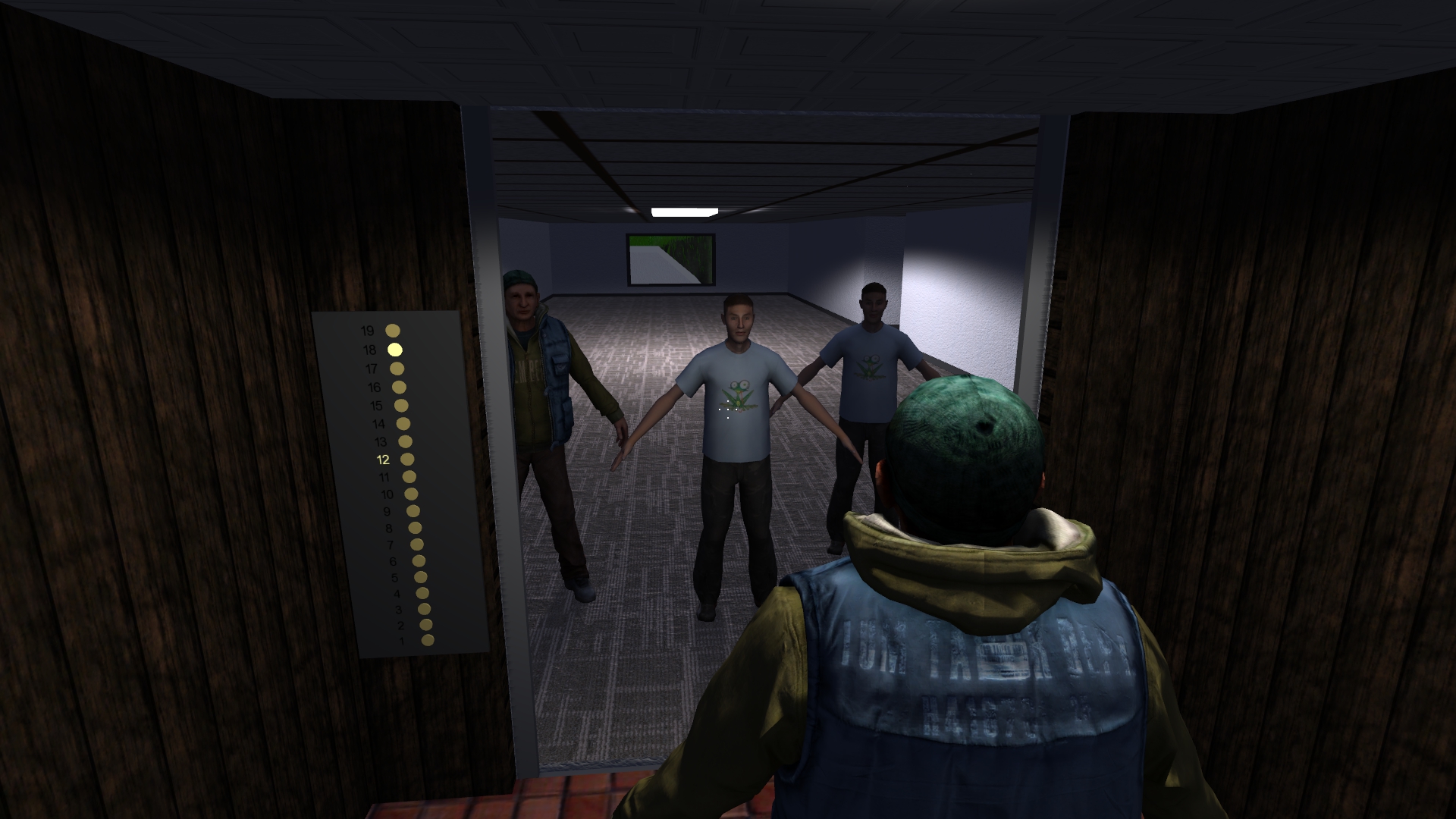
One final change I made was adding a floor number and direction display on each floor, outside the elevator by the door and above the call buttons. This will show the current floor the elevator is on and arrows indicating which direction it's moving when not stopped. Since I already had text drawing support, I made the arrows out of 90 degree rotated "<" and ">" angle bracket characters. Maybe it would have been better to reuse the turn arrow textures from city streetlights? I don't know, at least it fits with the drawing style of the numbers.

Here is a screenshot of an elevator interior control panel, in case you didn't catch it in one of the videos.

Interior of elevator with 19 floors.

And a screenshot of the elevator exterior showing the two call buttons, floor display, and up/down indicators. Sorry the screenshot is somewhat dark. This particular office doesn't have a ceiling light in front of the elevator.

Exterior of elevator viewed from floor 12 with it currently on floor 13 and going up.

That's it for this post. I'm not sure what the next step is. I might attempt to add support for multiple people in the elevator (capacity > 1), or possibly find a better solution for people crossing through each other when a pair is entering and exiting the elevator.


Saturday, October 1, 2022

Procedural Buildings: Extending Basements/Underground Rooms

Months ago, I added basements to 3D World’s procedural buildings, including both houses and office buildings. I quite liked the darker underground rooms. They gave zombie gameplay mode a scarier feel, and the lack of windows made it more difficult for the player to navigate this area. Now I've taken it one step further by adding "extended basements" to houses, which are a series of underground rooms connected by mazes of hallways. I like to call this the dungeon.

The first version consisted of a tree of branching hallways, where each hallway had up to four other hallways connected to it at right angles with doors. Then I assigned the dead end (leaf) rooms as other types such as storage rooms, bathrooms, card rooms, etc. Since it can be pretty disorienting to walk around here, I enabled the placement of rugs and pictures on the walls to make the hallways more recognizable. Each room also has a row of lights spaced out along the ceiling that the player can turn on and off.

Each room is placed with a variety of constraints to keep it from intersecting other objects. One constraint is that the entire ceiling area must be under the surface of the mesh. I was initially worried about tree roots poking into the occasional room, so to handle that I simply don't draw trees (or any vegetation) when the player is in the basement. Next, I had to make sure none of the rooms intersected other rooms or the house's basement. Finally, I had to check for intersections with other buildings, including their extended basements. It's okay for these extended basement mazes of nearby buildings to wrap around each other. They sometimes do just that.

Now this is more tricky than it would seem because building generation is multi-threaded and in theory two threads can be attempting to add basements to adjacent buildings at the same time. Of course the probability of that is likely very small, given that there are 16,000 total buildings to be processed in a random order. My partial fix for this is to block off the area around a building until all of its rooms are placed, which should at least avoid intersections with the main building and basement. However, it may not matter anyway, since only the building the player is currently in is drawn when they're in a basement. In theory there could be two basements on top of each other and the player will never know - though I guess I won't know for sure what happens until I come across that situation.

But how do we determine which building the player is actually in when their location is inside two overlapping rooms from different buildings? My fix for this is to keep track of the building the player is currently in, and only allow it to be updated if the player leaves the building. This way it's not possible to move from one building to another in two consecutive frames without being outside all buildings for a frame in between. While that works well, it may interfere with my future plans of connecting the basements between multiple buildings as a way for the player to move between buildings underground. That's an area for future work.

This looked good, but it was too difficult to get cornered by a zombie at a dead end. I decided to add loops to make it more like a maze and less like a tree. Any placed hallway that happens to fully intersect or cross a previously placed room will now connect to it with a door. This means that some of non-hallway leaf rooms are no longer dead ends, which increases the variety of these floorplans.

But that wasn't enough. What's better than a dungeon-like maze of underground hallways and rooms? How about a multi-level maze! So I went about adding stairs and multiple floors, and after a long time spent debugging failed basements I was able to get it to work. I have the number of floors limited to 3 in the config file to keep the extended basements sane, though there's no hard limit other than that the lowest floor needs to be above sea level. Lower levels are added by inserting stairs at the end of a hallway and ending the stairs at the entrance to a new hallway one level below. Lower levels are allowed to cross under upper levels and reconnect with hallways and stairs that lead back up. Some stairs have railings to add variety.

Here are some screenshots of extended basements shown from above, to give a better idea of their overall layout. I've disabled the terrain and grass so that they're visible. All surfaces have back face culling enabled, which is why the ceilings aren't visible. Keep in mind that rooms weren't intended to be viewed through the terrain like this, so the lighting is all wrong (among other problems).

Building extended basement viewed from above, with terrain, grass, and ceilings hidden. 2 levels.

Another extended basement viewed from above, with terrain, grass, and ceilings hidden. 3 levels.

Huge underground basement complex on multiple levels that runs underneath other buildings.

Generating and drawing these added rooms wasn't too bad, but that's only a fraction of the work. I had to make room lighting, shadows, and indirect lighting work. Ray casting and collision detection were more difficult when there are no exterior walls to bound these rooms. I had to make the AIs for building people understand how to navigate down here, follow the player, and cross between the house and its extended basement. Note that the structure down here is very different from the packed rectangular areas of the above ground parts of the buildings. There's empty space (or I would assume dirt) between these rooms, and that's a great place for the AI to get stuck. Finally, I had to make rats, snakes, and spiders properly handle these areas. This means I actually have to make these rooms work with 4 different AI systems! Overall I was able to share most of the code, but I did have to add quite a few special cases to the code.

Here are some screenshots of extended basements shown in the intended way where the player is inside the rooms rather than looking down with X-ray vision. You can't see too much at any given time due to the narrow hallways and right angle turns.

Extended basement with three levels (two sets of stairs) along the same hallway.

Extended basement hallways and rooms with a person, a rat on the floor, and railings for the stairs.

Even extended basements contain bathrooms, with mirror reflections.

I'm sure there are many future extensions of this system. As mentioned above, I would like to consider connecting the basements of adjacent houses that happen to be at the same elevation. It may also be interesting to add more basement and parking garage areas to office buildings in a similar way. I made some of the basement lights flicker, but I'm sure there are other interesting effects that I can add to increase the spooky atmosphere of basements.

Thursday, August 18, 2022

Snakes in Buildings

So far I've added people, rats, and spiders to buildings. They can all be considered a sort of enemy of the player in gameplay mode. What other hostile animals can I add? How about poisonous snakes that attack the player when they get close.

Snakes are similar to rats because they stay on the floor and can't climb walls and other objects like spiders. Snakes are limited to the ground floor and currently can't be picked up by the player. They're more aggressive than rats, and will bite the player when in range rather than running and hiding under furniture. However, they completely ignore the player when the player isn't right next to them. This makes them easier to avoid, assuming you're paying attention to your surroundings and being careful when entering new rooms.

There are currently two types of snakes, those with rattles and those without. All snakes can damage the player by biting, but only rattlesnakes are poisonous and will do damage over time. This uses the same mechanic as spider bites. The only item that can cure the player of poison is the medicine bottle, which can be found in house medicine cabinets and on rare occasions in drawers. I modified the player inventory to allow medicine bottles to be collected and consumed later if not immediately needed, which make it a bit easier to survive snake and spider venom.

I used a similar approach to spiders when drawing snakes, forming them procedurally in code from transformed cylinders, cones, and spheres. They consist of 18 connected segments, representing individual ribs, with a head at one end and either a tail or a rattle at the other. I found two different textures to use for their scales, and added a random color variation from light brown to nearly black. Each snake has two eyes on the sides of its head and a forked tongue that will occasionally come out.

Four snakes on the kitchen floor. One is a rattlesnake. The center snake has its pink tongue out.

Snakes have a unique movement and animation system. Each segment moves individually in a smooth motion that follows the path of the segment in front. The head moves in a sine wave pattern to give the body movement a wavy, flowing path that I based on the movement of my pet snake Audrey and other images and videos of snakes I found online. Snakes can also curve or straighten their bodies to fit through narrow openings and avoid collisions.

Collision avoidance was by far the most difficult feature to implement. Snakes must avoid the following objects, ordered from highest to lowest priority:

  • The edges of the building bounding cube (otherwise bad things happen such as the code crashing or the snakes disappearing)
  • Exterior building walls (outside the building they're not drawn correctly)
  • Interior building walls
  • Open and closed doors
  • Stairs and elevators
  • Static room objects (furniture, appliances, etc.); fortunately I was able to reuse all of the rat collision logic for these.
  • Other snakes, rats, and spiders
  • Themselves; it's important to avoid self intersections; this one was quite challenging

I already had code for most of the items near the top of the list. The only real difference between snakes and rats related to static object collisions is that representing snakes as a bounding sphere is too inaccurate. For the purpose of detecting collisions for the snake itself, I only need to consider a bounding sphere around its head. The rest of the body will follow the path of the head and will also avoid the same static objects. However, checking for collisions with other snakes and the snake itself requires finding intersections with each cylindrical body segment.

It took quite some time to get all of this working. When a collision is detected, a new head direction is randomly chosen within the 180 degrees around the collision normal. Directions closer to the initial head orientation are given a higher weight so that snakes are more likely to continue along a similar path rather than reversing direction and doubling back on themselves. The most common modes of failure for collision detection resulted in the snake getting stuck with its head slightly inside a wall or other object (including its own body).

I was able to fix all but one case of the snake getting stuck with reasonable effort. The final case was where a snake was forced into a curve while colliding with another snake, and it spiraled into itself to the point where its head was completely surrounded by its body and it couldn't move. After several failed attempts, I finally fixed this by setting the collision normal to be the direction of the colliding segment coming from its head. This would force the head to turn toward the direction of the tail on collisions, rather than curving toward itself.

I also found and fixed a pretty funny bug. When the snake was stuck against an object such as the player, it would choose random new direction each frame. This would cause the head orientation to jiggle around randomly. In addition, this triggered the animation system to update, which resulted in the snake's eyes spinning around its head!

Here's a YouTube video showing a number of snakes in the living room of a house. They glide around on the floor and attempt to avoid objects, each other, and themselves. I find it quite interesting how they can weave between the table and chair legs using collision avoidance forces. Note that I already fixed the rat vs. snake collision bug. I was incorrectly using the snake's bounding sphere radius rather than the snake's body radius to move the rat to a non-colliding position.